Get it for my Mac (1.6 GB)
 Neural DSP Archetype Rabea X
1.0.1
Neural DSP Archetype Rabea X
1.0.1

- Version
- 1.7.1
- Developer
- Native Instruments
- Interface in
- English
- Licence on file
- K'ed by TEAM HCiSO
- macOS it runs on
- macOS 13 or later
- Chip support
- Apple Silicon, Intel 64-bit
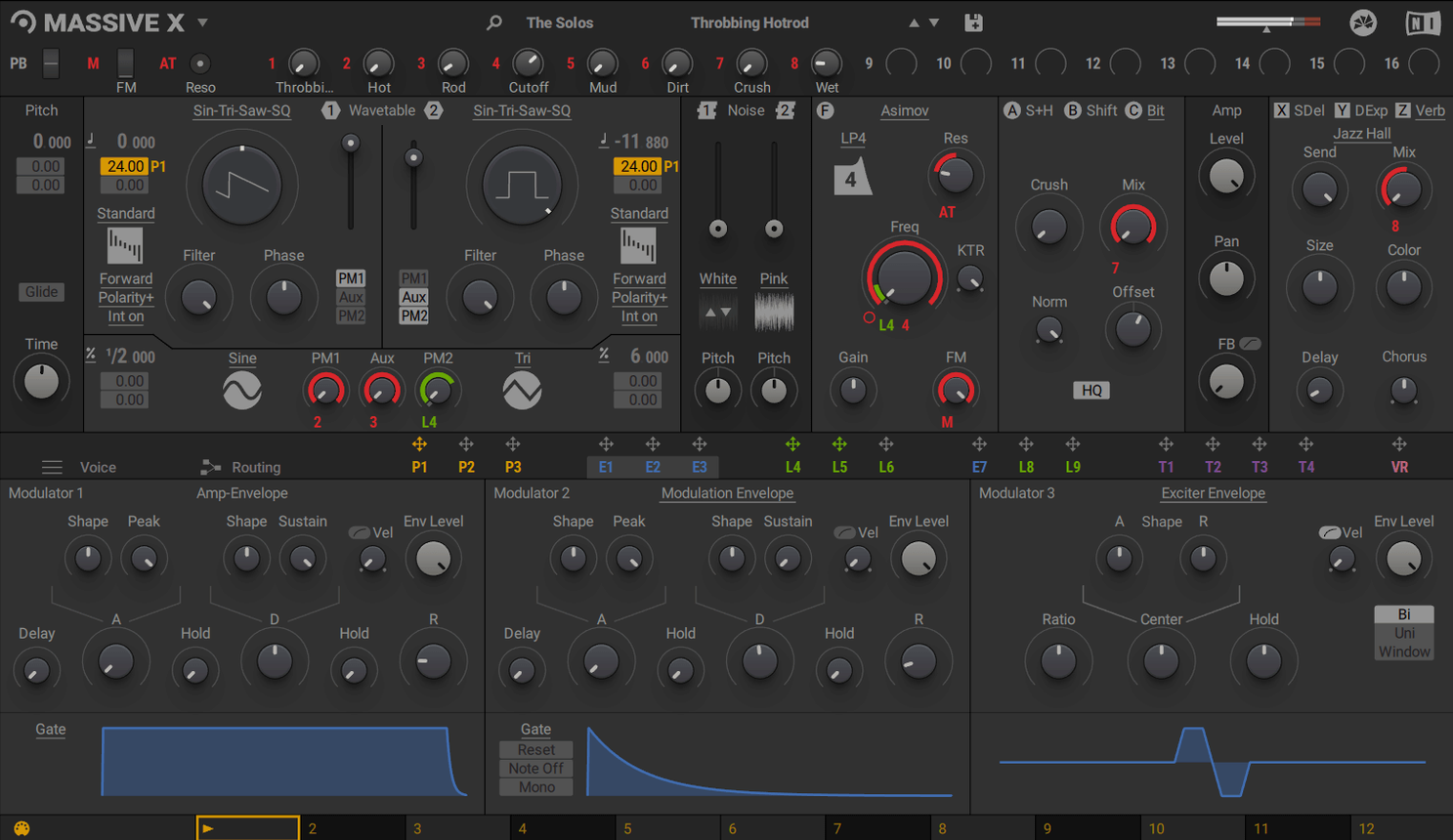
In the edit
Massive X runs on macOS 13 and later, supporting both Apple Silicon and Intel Macs. If you’re on an Intel machine, you’ll need a processor with AVX support. A graphics card with OpenGL 2.1 or higher is required, and you’ll need an internet connection to download and activate it. 4 GB of RAM is the minimum; 6 GB is recommended.
checking if your daw sees it
After installing, open your DAW and scan for new plugins. Massive X appears as a standalone instrument and as a VST, AU or AAX plugin. It can sit alongside the original Massive in your project, so old tracks keep working.
browsing the factory library
The factory library holds 780 presets, and the oscillator section offers more than 170 wavetable options with 10 playback modes. Two phase modulation generators add extra movement. All sounds are accessible from the browser inside the plugin.
Set polyphony to avoid voice stealing
When you open Massive X for the first time, the default patch is a solid starting point, but a few quick adjustments make it feel like your own. Head into the plugin’s settings panel and set the polyphony limit to something sensible for your system — 16 voices is usually enough for most parts, and it stops your CPU from sweating on dense patches. The tuning reference defaults to 440 Hz, but if you work with sampled instruments or film scores, you might want to shift it to 432 Hz or leave it as is. The browser’s tag system is worth a minute of your time: assign your own tags to presets you reach for often, so you can skip scrolling through 780 patches later.
Sound designers love the Performer section
Massive X suits a few specific Mac workflows particularly well. Sound designers who build textures and evolving pads will appreciate the Performer section and the modulation routing, because you can draw movement that changes over a bar or two and assign it to filters, pitch or wavetable position. Music producers working in genres like electronic, hip-hop or ambient get the most out of the oscillator section and the 170 wavetables — the new playback modes let you morph between waveforms in ways the original Massive couldn’t. Composers writing for picture might find the factory presets useful for quickly layering tension or atmosphere without spending an hour programming. If you run a MacBook Pro for live sets, the polyphonic engine handles chords well, though you’ll want to keep an eye on voice count. Keyboard players who prefer to trigger modulation patterns from the keyboard can use the Remote Octave control to play Performer patterns, which adds a live feel to sequenced parts.
Don't skip the routing section
A few common missteps trip people up when they first use Massive X. One is ignoring the routing section entirely — it’s easy to treat it like a simple subtractive synth, but the plugin’s strength is in its flexible routing, where any output can connect to any input. Beginners often leave the modulation matrix empty, missing out on the two phase modulation generators that add character. Another mistake is keeping the default filter type on every patch; swapping between the filter models changes the sound dramatically and costs nothing in CPU. Some users also overlook the Performer section, thinking it’s just an LFO replacement, when it can actually draw complex patterns that don’t repeat in a standard cycle. Finally, don’t forget that Massive X coexists with the original Massive in your DAW — if you have old projects that use Massive, you don’t need to migrate them. Just load both plugins and carry on.
1.7.1 made it stable on macOS 13
Version 1.7.1 brought stability improvements rather than new features, so the everyday experience feels the same as before for most users. The update ensures the plugin loads reliably on macOS 13 and later, both on Apple Silicon and Intel Macs with AVX support. If you’re on a newer Mac running Ventura or Sonoma, you’ll notice that the plugin no longer throws compatibility warnings during the scan. For users who work in large KOMPLETE instrument sessions, the update keeps Massive X in step with the rest of the Native Instruments ecosystem, so loading a project with multiple KOMPLETE instruments doesn’t cause conflicts. There’s no change to the wavetable library, the presets or the modulation system — it’s the same synth, just better behaved on current hardware and operating systems. If you’ve been putting off the update because your old version worked fine, 1.7.1 is worth grabbing for peace of mind on the latest macOS builds.
Version 1.7.1 is the latest release. It keeps the plugin stable on current macOS versions and maintains compatibility with KOMPLETE instruments.
New this release
- Version 1.7.1 is the latest update for MASSIVE X.
Mac it needs
- macOS 13 or later
- Apple Silicon or Intel processor (AVX required for Intel Macs)
- 4 GB RAM (6 GB recommended)
- Graphics card with OpenGL 2.1 or higher
- Internet connection for download and activation
Questions I actually get
Can I use Massive X alongside the original Massive?
Yes, Massive X coexists with Massive for existing DAW projects and access to Massive sounds.
How many presets does Massive X come with?
The factory library contains 780 presets.
What kind of wavetables does Massive X include?
It provides more than 170 wavetable options and 10 wavetable playback modes.
Installing on a Mac
- Open the downloaded disk image.
- Run the standard installer.
- Tip: Make sure your DAW is closed during installation.
Notes from photographers
Sign in or create your account to leave a comment.
No notes from photographers yet. If you have used this on a real folder, say which camera and which Mac.