Get it for my Mac
  VocalNet
1.0.4
VocalNet
1.0.4
- Version
- 13.0.30
- Developer
- Steinberg
- Interface in
- English
- Licence on file
- Included
- macOS it runs on
- macOS 13 or later
- Chip support
- Apple Silicon, Intel 64-bit
In the edit
WaveLab Pro is the kind of software that sits at the end of a long production chain — the place where mixes get their final polish. It's used by mastering engineers, producers who finish their own tracks, and post-production folks who need forensic audio analysis or Dolby Atmos assembly.
Open a file and try spectral editing
Drop a stereo mix into the audio editor, then switch to the spectral view. You can see clicks, breaths and background rumble as coloured shapes, and remove them with a brush tool. It’s the fastest way to clean up a recording without losing the feel of the performance.
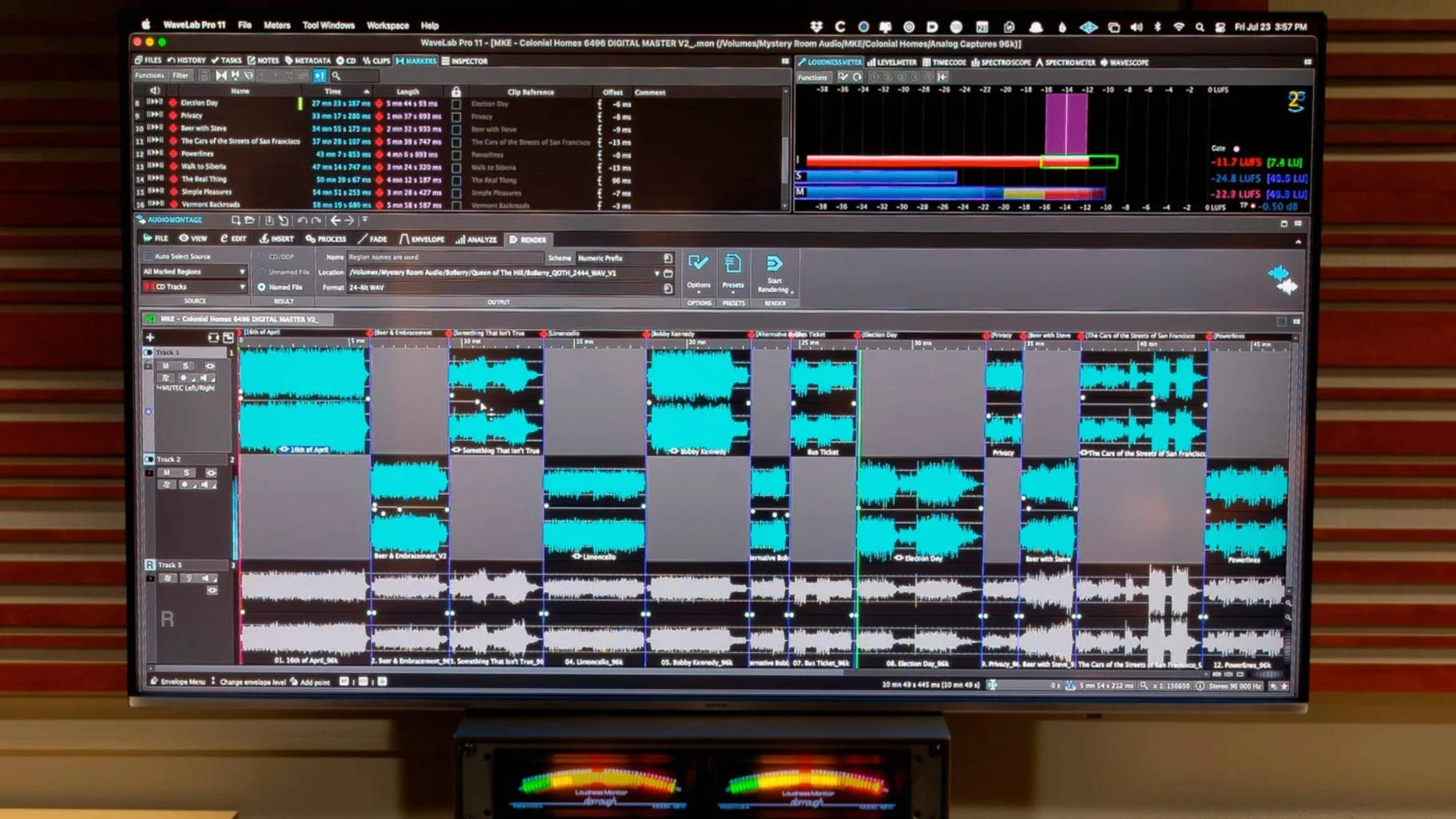
Build a master montage
Arrange several songs or cues in one project, apply processing per track and across the whole sequence. Version 13.0.30 lets you include Dolby Atmos channel-based surround files in those montages, which matters if you’re preparing immersive masters alongside stereo ones.
Sync navigation and compare versions
Link the file window and the montage window so scrolling one scrolls the other. That makes it easy to jump between the raw edit and the mastered timeline. Drag and drop works across both, and copy-paste between platforms keeps the workflow fast when you’re switching between tools.
Drops right into your Mac workflow
WaveLab Pro doesn't ask you to rebuild your workflow around it. On a Mac, it behaves like a piece of the system rather than a walled-off island. Drag a region from the montage onto the Finder desktop, and you get a rendered audio file without opening a dialogue. Copy a selection in WaveLab and paste it into Logic Pro, or the other way around — it just works. The ARA plug-in version is the neatest integration trick: load WaveLab inside Cubase, Nuendo, Reaper or Studio One as a connected editor. Edit in WaveLab, and the changes appear back in the host timeline without bouncing or exporting. That saves a lot of back-and-forth if you're doing detailed spectral work on a track that's still part of a larger session.
macOS features like Quick Look work with WaveLab's native file format, so you can spot-check a montage from the Finder without launching the app. The waveform scaling that auto-fits peaks into the visible area is a small thing, but when you're switching between a quiet dialogue file and a loud mix, it saves you reaching for the zoom tool every time. And if you're working on a laptop between locations, the fact that the software runs natively on both Apple silicon and Intel Macs means you're not tied to one machine generation.
Removing a humming air conditioner and mouth clicks
Here's a scenario that rings true for someone I know who cleans up location audio for short films. She gets a stereo recording of a voiceover recorded in a room with a humming air conditioner and a few mouth clicks. She drops the file into WaveLab's audio editor, switches to spectral view, and brushes out the hum and the clicks in a few minutes. The voice still sounds natural because spectral editing lets you see exactly where the noise sits in the frequency range. Then she copies the cleaned region and pastes it straight into a Reaper session where the picture editor has laid down the rough cut. The ARA plug-in version isn't needed here because the copy-paste is enough. Later, when the client wants a Dolby Atmos master of the film's soundscape, she uses WaveLab's master montage to assemble the surround files, loads her personal HRTF profile for binaural monitoring, and checks the immersive mix on headphones before sending it off. That kind of workflow — clean up in spectral view, paste into the DAW, finish in a surround montage — is hard to replicate in a single app.
No spectral editing in Audiofile Engineering Triumph
There are a few other audio editors and mastering tools on macOS, but they approach the job differently. Audiofile Engineering Triumph is a capable two-track editor with a clean interface and good batch processing, but it doesn't offer spectral editing or Dolby Atmos support. It's a solid choice if you mostly do simple edits and fades, but it doesn't stretch into the forensic or immersive side of things. Izotope RX is the closest competitor for spectral editing and audio restoration. It's excellent at removing noise, clicks and reverb, and its machine-learning tools are impressive. But RX is built as a repair toolkit, not a full mastering environment — you can't build a master montage with track sequencing and crossfades, and it doesn't handle Dolby Atmos assembly. WaveLab Pro covers both the restoration and the final assembly in one place. Logic Pro includes a capable audio editor and can do mastering with the right plug-ins, but it's a DAW first. The editing view is fine for quick fixes, but it doesn't have the sample-accurate spectral editing or the dedicated mastering montage workflow that WaveLab is built around. If you're already deep in Logic, you might not need a separate editor. But if mastering is your main job, a purpose-built tool saves time.
Mastering engineers switching between stereo and Dolby Atmos
Mastering engineers who work with both stereo and immersive formats will find the most to like here. The ability to switch between a two-track edit and a Dolby Atmos montage, with personal HRTF monitoring, means you're not juggling separate tools for different delivery formats. Music producers who finish their own mixes will appreciate the spectral cleaning and the montage workflow for sequencing an EP or album. Post-production editors who clean up dialogue, foley or location audio will use the spectral view daily, and the ARA integration means they can stay inside their main DAW for most of the session. Audio forensics users — people who need to verify recordings or clean up noisy evidence — get the sample-accurate editing and restoration tools without the music-centric features getting in the way. The common thread is that WaveLab Pro rewards users who need precision editing and a clear path from raw audio to a finished master, whether that's a stereo track, a surround mix or a full album.
New this release
- Dolby Atmos master montages can include channel-based surround files.
- Dolby Atmos binaural monitoring supports loading a personal HRTF profile.
Mac it needs
- macOS 13
- Intel or Apple Silicon
Questions I actually get
Can WaveLab Pro be used inside a DAW?
Yes, the plug-in version of WaveLab Pro can be hosted inside compatible DAWs such as Cubase 13, Nuendo 13, Reaper 7, and Studio One 6.5.
What macOS version does WaveLab Pro 13.0.30 require?
It requires macOS 13 or later and runs on both Intel and Apple Silicon Macs.
Installing on a Mac
- Follow the included installation and activation instructions.
Notes from photographers
Sign in or create your account to leave a comment.
No notes from photographers yet. If you have used this on a real folder, say which camera and which Mac.