Get it for my Mac (745 MB)
 Neural DSP Archetype Rabea X
1.0.1

- Version
- 1.0.0
- Developer
- Neural DSP Technologies
- Interface in
- English
- Licence on file
- K'ed by FLARE
- macOS it runs on
- macOS 10.15 or later
- Chip support
- Apple Silicon, Intel 64-bit
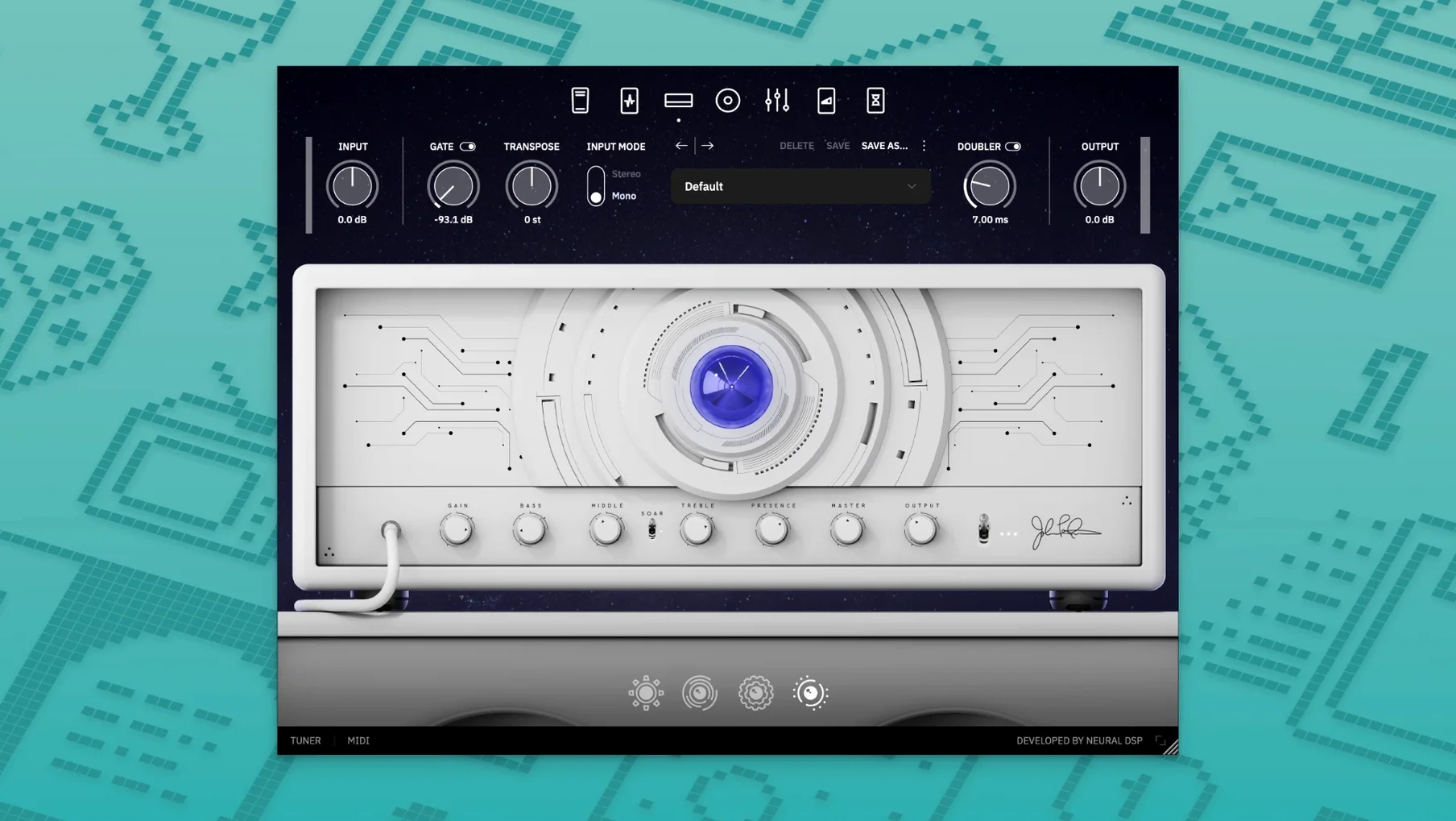
In the edit
If you are on a Mac with Apple Silicon, this plugin runs natively — no Rosetta translation needed. It also works on Intel-based Macs running macOS 10.15 or later, so most modern machines are covered. The plugin is a guitar amp and effects suite designed around John Petrucci’s signature sound, with a restrained but powerful character that suits both clean and high-gain playing.
It is a single plugin in VST, AU and AAX formats, and the interface is in English. The installer is straightforward: you open the downloaded disk image and run the standard installation procedure. The current version is 1.0.0, released in November 2024, and it is also compatible with Quad Cortex and Quad Cortex mini for those who use Neural DSP hardware.
People often ask about the sound — it is not a jack-of-all-trades modeller, but a focused collection of amps and effects that aim for precision and clarity. If you know Petrucci’s work, you will recognise the territory: tight distortion, dynamic cleans, and usable effects that do not get in the way. The plugin is a good fit if you want a polished, direct tone without endless tweaking.
Dialing In Sounds Reveals a Few Hidden Details
Once you have the plugin installed and start dialling in sounds, a few details become noticeable over time. They are not the kind of features that jump out from a spec sheet, but they affect how quickly you can get from an idea to a recorded part.
The interface keeps everything on a single screen. There is no tab-switching or hidden menu diving to find the noise gate or the cab section. For a working guitarist who is tracking a part between takes, that matters — you adjust a knob, move on, and do not lose the flow. The controls are labelled clearly and the layout follows a left-to-right signal path, which makes sense whether you are a seasoned engineer or someone who mainly plays and records at home.
Another detail is the built-in tuner. It lives in the plugin itself, so you do not need to reach for a separate tuner pedal or a DAW utility. It is always there when you need to check tuning between takes, and it stays out of the way when you do not. The metering on the output section is also useful for keeping levels consistent when you switch presets or scenes during a session.
The plugin also includes a metronome and a looper. These are not groundbreaking on their own, but having them inside the same window means you can work on a riff, loop it, and tweak your tone without switching between applications or reaching for outboard gear. For practice or songwriting, that convenience adds up over a long session.
A workflow for dialling in a rhythm tone from scratch
Let me walk through a typical starting point. Say you want a tight, modern rhythm tone for recording a metal or progressive part. Open the plugin in your DAW as an instrument track or insert it on an audio track if you are re-amping. The standalone version also works if you just want to play and hear yourself immediately.
Start with the noise gate at the input. Turn the threshold down until the gate closes when you stop playing, then back it off just a little so it opens cleanly on your first attack. This keeps the signal quiet between riffs without choking your playing. The gate is responsive and does not sound artificial when set well.
Next, pick one of the amp channels. For a rhythm tone, the crunch or lead channel is usually the better starting point. Keep the gain lower than you think you need — Petrucci’s sound is about clarity, not saturation. Set the bass, mid and treble to noon as a baseline, then adjust the mid control to sit the guitar in the mix. A little more mid helps it cut through a busy arrangement; less mid pushes it wider but can make it sound thin on its own.
The cab section comes next. The plugin includes several cabinet and microphone options. For a tight rhythm, a closed-back cab with a dynamic microphone placed close to the cone gives that focused attack. If the tone feels too boxy, move the virtual microphone position slightly off-axis or try a different mic type. The controls are immediate, so you can hear the change as you drag.
Add reverb or delay only if the part needs space. For a dry, present rhythm tone, skip the effects entirely and keep the sound direct. Once the tone is set, save it as a preset. The plugin lets you name and store your own presets, which is useful when you want to recall the same sound for different sessions or songs.
If you own a Quad Cortex, you can transfer this tone to the hardware and use it live. The compatibility between the plugin and the hardware is one of the practical advantages of staying within the Neural DSP ecosystem.
Archetype Petrucci Versus Helix Native and TH-U for Mac
There are a few other options on macOS for guitarists who want high-quality amp simulation. I will compare Archetype Petrucci with two others that sit in a similar space: the Line 6 Helix Native plugin and the Overloud TH-U suite. Each has its own approach, and the right choice depends on how you work.
Helix Native is a comprehensive modeller that emulates a large library of amps, cabs and effects. It gives you a huge range of tones, from vintage clean amps to modern high-gain heads. The workflow is based on a virtual pedalboard and rack system, which is flexible but can take time to learn. If you need one plugin that covers many genres and you enjoy building complex signal chains, Helix Native is a strong option. However, the sheer number of options can slow you down if you just want to find a good metal tone and record.
Overloud TH-U is another modeller with a broad selection of gear models. It includes a feature called Rig Player that lets you load profiles of real amps, which is useful if you want the character of a specific vintage amplifier without owning it. The interface is busy but logical once you spend time with it. TH-U is a good choice if you want variety and profiling capability, but the focus is on breadth rather than a single signature sound.
Archetype Petrucci takes the opposite approach. It does not try to be everything. Instead, it offers a carefully curated set of amps, cabs and effects that are tuned to work together. The gain structure is designed for clarity, the effects are chosen for practical use, and the whole thing is built around a specific musical voice. If you already know you want a tight, modern sound in the progressive metal or hard rock territory, you will get there faster with Petrucci than by dialling through hundreds of models in a broader suite. It is less about options and more about finishing the take.
Using the Standalone Version Without an Audio Interface
Do I need an audio interface to use it?
The standalone version works with your Mac’s built-in audio output, but for low-latency playing and recording, an audio interface is strongly recommended. The plugin itself does not require any specific hardware beyond a Mac that meets the system requirements.
Will it work in Logic Pro, Ableton Live or Pro Tools?
Yes. The plugin comes in VST2, VST3, AU and AAX formats, so it is compatible with all major DAWs on macOS. The AU format covers Logic and GarageBand, VST works with Ableton, Cubase and others, and AAX is for Pro Tools. The installer places all formats automatically, so you do not need to choose.
Can I use it live without a computer?
The plugin itself runs on a computer, but the presets and the underlying engine are compatible with Quad Cortex and Quad Cortex mini. If you have that hardware, you can build tones in the plugin and transfer them to the unit for live use. That is the only way to take the sounds off your Mac.
Is it a heavy plugin on CPU?
Every system is different, but the plugin uses native Apple Silicon code on M-series Macs, which helps efficiency. The cab and reverb sections will add some load, as with any high-quality amp sim. If you are tracking multiple takes, you can freeze or bounce tracks to free up resources once you are happy with the tone.
Do I need an internet connection to run it?
Once installed and activated, the plugin does not require a constant internet connection. The activation process itself needs a connection, but after that you can work offline.
What the Initial Public Release of November 2024 Means for You
The current version is 1.0.0, released on 21 November 2024. This is the initial public release for both Windows and macOS, so there is no prior version to compare it against within the Archetype Petrucci line. What that means in practice is that the plugin arrived fully formed with the features described throughout this article — native Apple Silicon support, VST2/VST3/AU/AAX formats, Quad Cortex compatibility, and the full set of amps, cabs and effects.
For anyone who has used other Neural DSP Archetype plugins before, the familiar workflow is here from day one: same installer process, same preset system, same signal flow layout. The difference is the voice of the plugin itself, which is tuned specifically around Petrucci’s approach to tone. There are no experimental or unfinished features — it is a polished first release that does exactly what it sets out to do.
Because it is version 1.0.0, there is no update history of bug fixes or added features. The plugin works as released, and any future updates will build on this foundation. For now, it is a solid, focused tool for guitarists who want a signature sound without compromise.
New this release
- Initial 1.0.0 release for Windows and macOS.
Mac it needs
- macOS 10.15 or later
- 64-bit system
- Native Apple Silicon support
- Intel or Apple Silicon processor
Questions I actually get
Does Archetype Petrucci run natively on Apple Silicon Macs?
Yes, the plugin has native Apple Silicon support, so it runs without Rosetta on M1, M2 and M3 Macs.
Can I use Archetype Petrucci with Quad Cortex hardware?
Yes, it is compatible with Quad Cortex and Quad Cortex mini, so you can load the same presets on your hardware unit.
Installing on a Mac
- Open the downloaded disk image.
- Run the standard installation procedure.
Notes from photographers
Sign in or create your account to leave a comment.
No notes from photographers yet. If you have used this on a real folder, say which camera and which Mac.