Get it for my Mac (65 MB)
 Exposure X7
7.3.2
Exposure X7
7.3.2
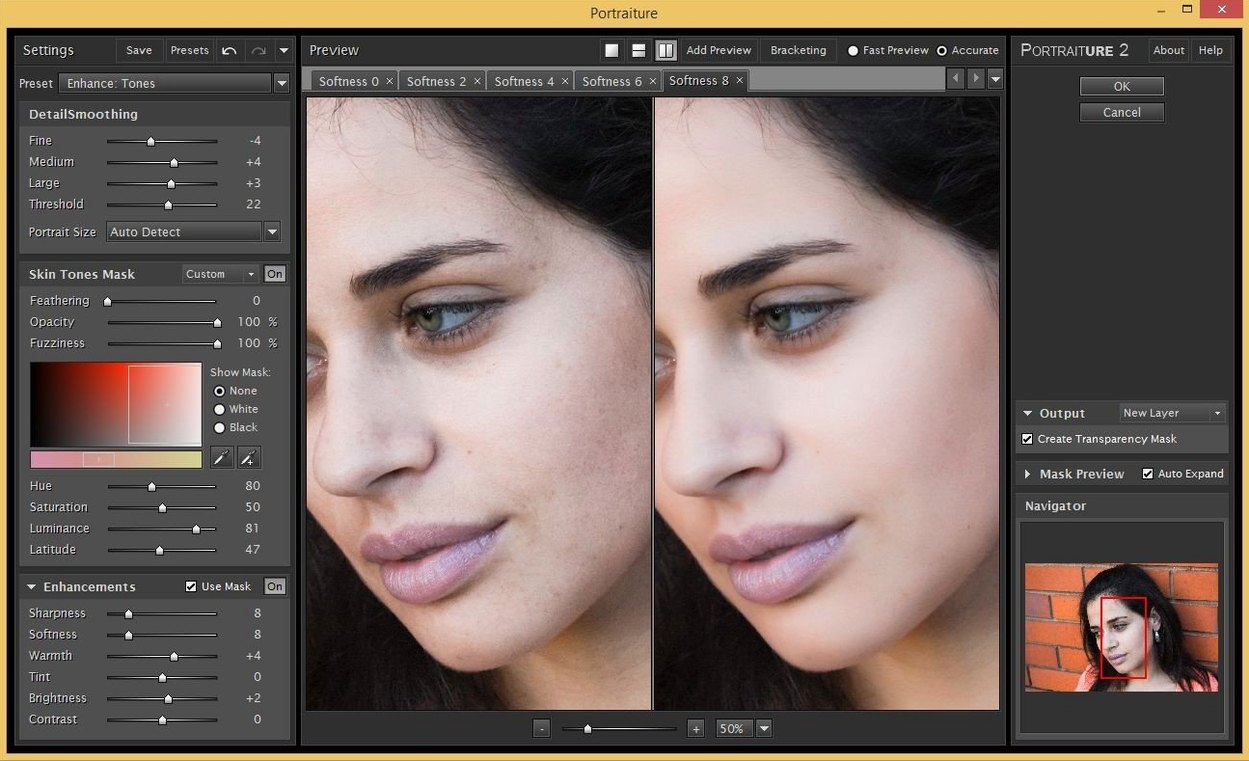
The plugin runs as a native filter inside Photoshop and as a separate build for Lightroom Classic, so the masking, opacity and layer workflow stays exactly where you expect it.
The fine-tuning panel — threshold, opacity and detail sliders — gives you per-channel control over how the smoothing applies to skin versus edges. You can set separate values for the whole image and then brush in or out specific areas using the built-in masking preview. That matters when you want to keep freckles, stubble or fabric texture while softening the underlying skin tone.
If you shoot tethered or process weddings in sets, the plugin remembers your last preset per session. You can save your own profiles for different skin types, lighting conditions or colour temperatures and apply them across a whole Lightroom import without opening each file individually. The colour-range picker inside the mask also helps when you are working with mixed lighting and need to protect highlights or shadows from the smoothing pass.
Portraiture sits in a small but busy category of portrait‑focused plugins. The closest alternatives are probably Beauty Box and PortraitPro, though each takes a different route to the same goal.
Beauty Box leans heavily on automatic skin detection and a single‑pass approach. It works quickly, but you get less say in which tones get smoothed and which get left alone. Portraiture gives you the threshold and detail sliders plus the colour‑range picker, so when a subject has a tan line or uneven makeup, you can tell the plugin exactly where to back off. For a wedding photographer editing a bride with freckles and a groom with stubble in the same frame, that extra control matters.
PortraitPro is a standalone app rather than a filter you run inside Photoshop. That means you export, open the image, make your adjustments, save and go back. It works well for single portraits where you want to reshape features or adjust lighting, but it adds steps to a layered retouching workflow. Portraiture stays inside Photoshop or Lightroom Classic, so the adjustment sits on its own layer or lives in the Develop module without leaving the main window. If you work with action sets or batch presets, that difference alone saves time across a full gallery.
The official product page now lists Affinity Photo as a supported host alongside Photoshop and Lightroom Classic. That makes Portraiture a more flexible choice if you switch between Adobe and Affinity workflows, or if you keep both installed for different projects.
You shoot a family of five in late afternoon light. The kids have sun‑kissed cheeks, the parents have combination skin, and everyone is in a group shot where selective retouching is impractical. Instead of brushing masks manually across five faces, you load Portraiture, pick a saved profile for mixed skin tones, and let the AI smoothing engine handle the detection. The colour‑range picker keeps the grass and clothing textures untouched. A quick check of the masking preview shows you that the detail slider is holding onto the kids' freckles while softening the mother's forehead. The whole group takes about the same time as a single headshot would with manual dodging and burning. That is the kind of session where Portraiture stops being a nice extra and becomes the tool that gets the gallery delivered on time.
Portraiture 4.5 Build 4501 runs on macOS 13 and later, and it supports both Apple Silicon and Intel Macs with the 64‑bit build. The plugin itself is a straightforward installer that places the filter into your Photoshop or Lightroom Classic plug‑ins folder, and a separate download is provided for each host. The interface language is English. No separate app runs in the background — it lives inside the host software and loads when you call it from the filter menu or the Develop module. Because it is a plugin rather than a standalone program, it does not add a dock icon or a menu‑bar process. Once installed, you see it listed alongside your other filters in Photoshop or as an external editor preset in Lightroom Classic.
The plugin respects the standard macOS colour management pipeline, so it works with whatever display profile you have set in System Settings. If you use Apple's Photos app to cull selects before opening them in Photoshop, the TIFF or JPEG you export keeps its colour space and Portraiture reads it correctly. The same applies if you use Capture One for tethered shooting and round‑trip to Photoshop for retouching — the plugin sees the same file you see.
For photographers who batch‑rename or export through Photo Mechanic before sending images to Lightroom, the preset‑saving feature means you can apply the same skin‑smoothing profile to the whole import without reopening each file. And because the plugin keeps its settings per session, you can switch between a portrait preset and a beauty preset as you move through different shoots in the same edit block.
If you are running a Mac with Apple Silicon, Portraiture runs natively — no Rosetta translation layer needed for the ARM build. That keeps the plugin responsive even when you have multiple layers, a large document and other filters applied. On Intel Macs, the x86 build works the same way. The installer handles both architectures, so you pick the right download and the rest is automatic.
It requires macOS 13 or later and runs on both Intel and Apple Silicon Macs.
Yes. The product page lists separate downloads for Photoshop and Lightroom Classic builds.
It works within Photoshop and Lightroom Classic, so it processes whatever image you have open — including RAW conversions in Lightroom's Develop module.
Sign in or create your account to leave a comment.
No notes from photographers yet. If you have used this on a real folder, say which camera and which Mac.