Get it for my Mac (391 MB)
 Arturia CZ V
1.9.2
- Version
- 1.7.1 (6566)
- Developer
- Arturia
- Interface in
- English
- Licence on file
- K'ed by MORiA
- macOS it runs on
- macOS 10.13 or later
- Chip support
- Apple Silicon, Intel 64-bit
In the edit
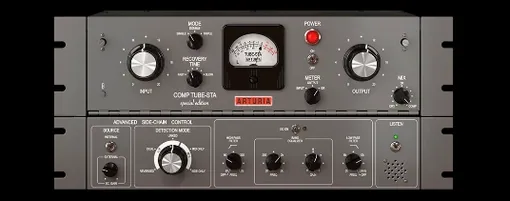
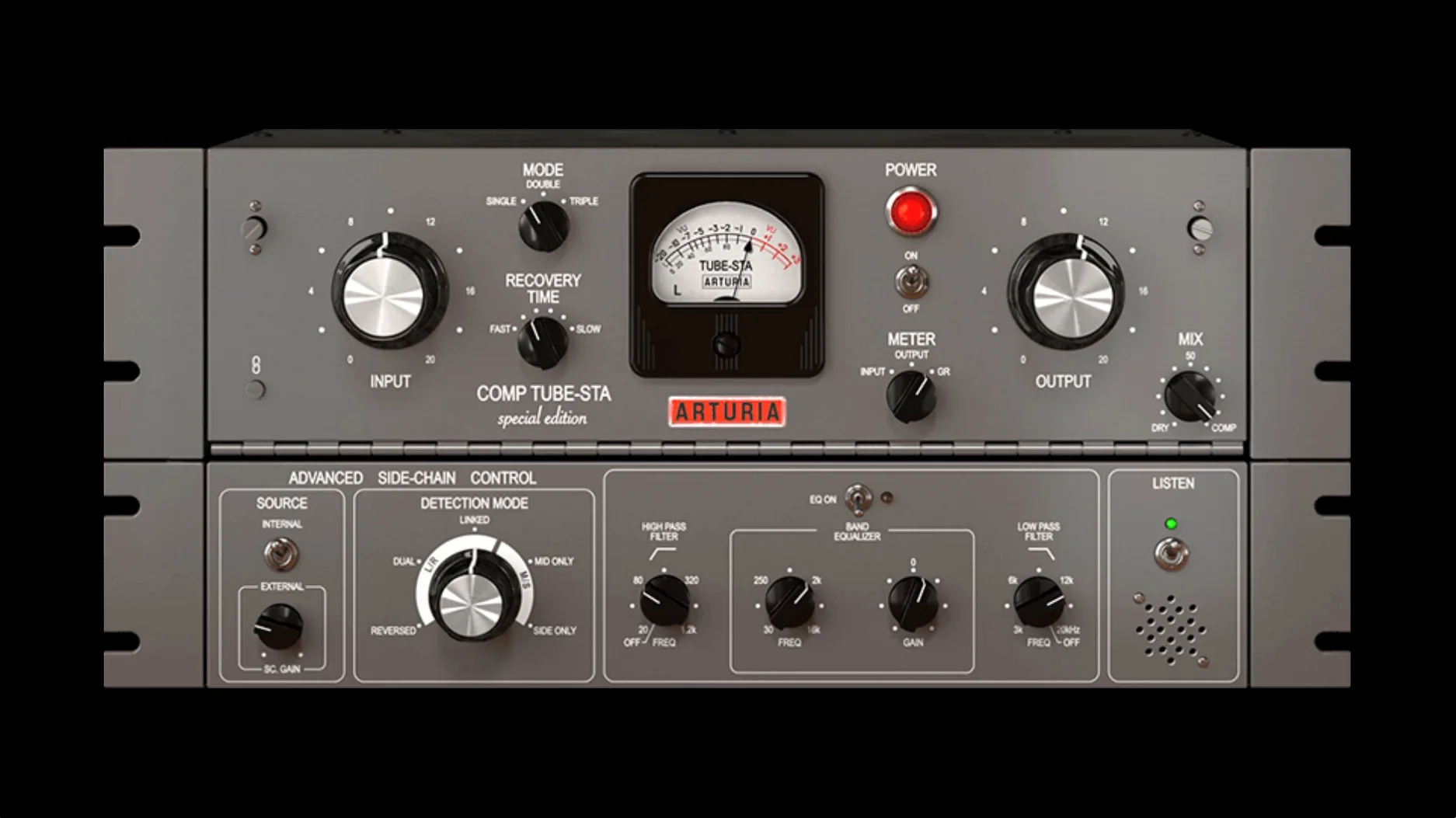
Arturia’s Comp TUBE-STA ships as a 64-bit plugin in VST, VST3, AU and AAX formats, so it fits Logic, Pro Tools, Ableton Live, Cubase and most modern Mac hosts. It runs natively on both Intel and Apple Silicon Macs, needing at least macOS 11.0. The plugin recreates the Gates STA-Level tube compressor, a unit known for smoothing vocals and bass without losing punch. Arturia’s version adds an advanced panel with mid-side processing and sidechain controls, turning a classic mono leveller into a flexible mixing tool. The core sound stays warm and musical, with that slow, natural gain reduction tube gear is known for.
Resizable GUI that keeps its sharpness
The Comp TUBE-STA keeps its main panel clean, but a few details in version 1.7.1 (6566) make daily use a little smoother. The resizable GUI is one — drag the corner and the interface scales without losing sharpness, which helps on a 13-inch MacBook screen or a larger external display. No hunting for a tiny knob when you are in the middle of a vocal comp.
The advanced panel hides the mid-side processing and the SSL-style EQ until you need them. That means you can start with the simple controls, get the gain reduction where you want it, and only open the extra section when a track asks for more surgical work. It keeps the plugin from looking intimidating on the first insert.
Sidechain controls live in that same advanced panel, letting you key the compressor from another track. Useful when you want a bass part to pump in rhythm with a kick drum, or a pad to duck under a vocal phrase. The implementation stays straightforward — set the sidechain source and adjust the amount, no deep menu diving.
The plugin also loads quickly in a session. When you are working through a mix and swapping compressors on a vocal bus, a plugin that appears instantly matters more than you think.
Vocal and bass compression that stays warm
Anyone mixing vocals or bass will feel at home here. The original STA-Level was built for those jobs, and Arturia’s recreation keeps that focus. If you record singers and want a consistent, warm compression that does not overreact to transients, the Comp TUBE-STA handles it in one or two knobs. The same goes for bass processing — electric, synth or DI — where the tube character adds body without turning the low end into mud.
Mix engineers working on pop, soul, rock or electronic music will find the advanced sidechain and mid-side processing useful for fitting elements together. The SSL-style EQ in the advanced panel lets you shape the signal before it hits the compressor, which can help you avoid pumping from heavy low frequencies or tame sibilance on the way in.
Producers who prefer a minimal plugin chain will like that this one does both compression and basic EQ in a single instance. You can skip an extra EQ plugin on a vocal channel if the built-in one does what you need. That saves CPU and keeps the session tidy.
Less obvious: podcast editors and voiceover engineers who want a consistent level across takes without aggressive limiting will also get good results. The tube compression is forgiving, and the simple controls mean less time tweaking and more time editing.
Start with the main panel for 3-6 dB of gain reduction
Start with the main panel only. Open the plugin on a vocal track, set the input to get 3-6 dB of gain reduction, and listen. The tube character reveals itself better when you do not overcompress. Once you hear how it colours the track, you will know when to push harder.
Try the mid-side mode on a stereo bus or a drum room mic pair. Process the mid and side independently — you might compress the centre harder and leave the sides more open, or the opposite. It gives a stereo image control that the original hardware could not do.
Use the sidechain high-pass filter to keep the compressor from reacting to low-frequency thumps when you are compressing a mix bus or a group. It stops unnecessary pumping and keeps the gain reduction musical.
If you are new to tube compressor emulations, remember that the attack and release are slower than modern VCA or FET compressors. Do not expect fast, aggressive limiting. Instead, let the plugin smooth out the performance over a few milliseconds. It works best when you give it time to breathe.
Save a preset after you find a setting you like on a vocal or bass. The plugin loads with a neutral starting point, but having your own go-to setting ready speeds up the next session.
Answers about installing and using Comp TUBE-STA
Native ARM support on Apple Silicon Macs
Yes. Version 1.7.1 (6566) supports both Intel and Apple Silicon Macs, and the plugin runs natively in ARM mode. No Rosetta needed in Logic, Ableton or any other modern host.
Works standalone without the full FX Collection
No. The Comp TUBE-STA can be installed and activated on its own. The package includes the plugin files and the activation instructions.
Adds an SSL-style EQ in the advanced panel
It is a compressor first, but the advanced panel includes an SSL-style EQ that can shape the signal before compression. It is not a full parametric EQ, but it is enough to cut muddiness or add presence before the tube stage.
Warm glue and mid-side control for the master bus
You can. The tube compression adds a warm glue that works well on a mix bus, especially in styles where you want gentle, musical gain reduction. The mid-side processing gives you stereo control that the original hardware did not have. Just watch the gain reduction — a few dB goes a long way.
Does the plugin use a lot of CPU?
It is a tube emulation, so it uses more processing than a simple digital compressor, but it is not unusually heavy. The resizable GUI and the advanced panel do not add noticeable overhead. If you run many instances, freezing tracks or bouncing to audio helps.
What host formats are included?
VST, VST3, AU and AAX. That covers Logic, Ableton, Cubase, Pro Tools, Studio One, Reaper and most other Mac DAWs. The plugin is 64-bit only.
Mac it needs
- macOS 11.0 or later
- Intel or Apple Silicon Mac
- 64-bit host supporting VST, VST3, AU or AAX
- Interface language: English
Questions I actually get
What are the key features of the Arturia Comp TUBE-STA plugin?
It recreates the Gates STA-Level tube compressor and includes mid-side processing, advanced sidechain controls, and is positioned for vocal and bass processing. It is part of Arturia’s compressors product group and the FX Collection.
Installing on a Mac
- Run the installer and follow the on-screen prompts.
- Activate the plugin using the instructions included in the package.
- Tip: restart your DAW after installation so it scans the new plugin.
Notes from photographers
Sign in or create your account to leave a comment.
No notes from photographers yet. If you have used this on a real folder, say which camera and which Mac.