Get it for my Mac (37 MB)
 iZotope Insight
2.4.0
- Version
- 2.2.313
- Developer
- Imagiro
- Interface in
- English
- Licence on file
- K'ed by SEA SLUG
- macOS it runs on
- OS X 10.10 or later
- Chip support
- Apple Silicon, Intel 64-bit
In the edit
You've got a quiet verse that needs something worn and warm. Not a pristine grand, not a sampled stage piano — something that sounds like it was recorded in a lived-in room with a bit of tape hiss. That's where Imagiro Piano sits.
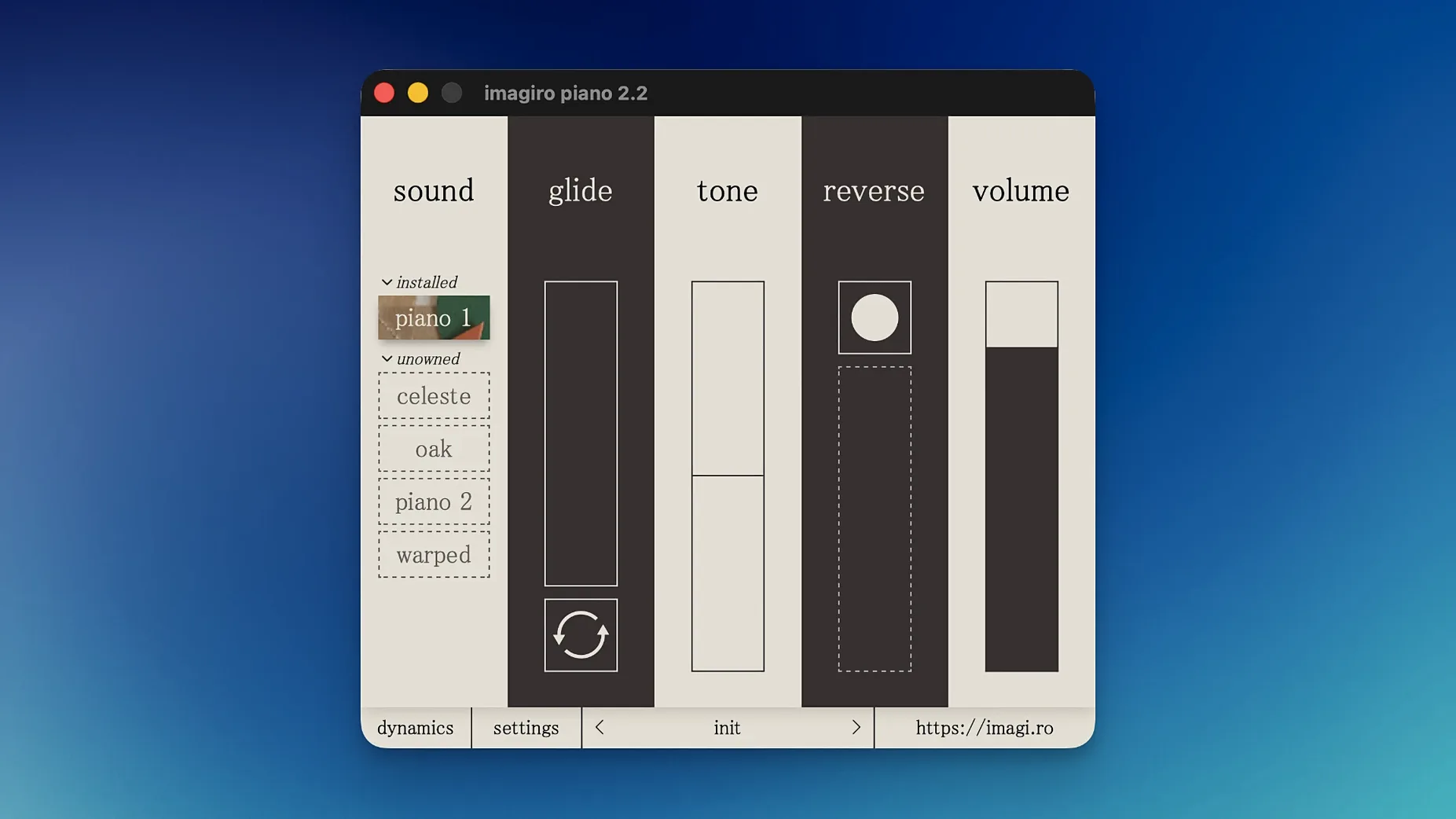
This virtual instrument blends home-recorded piano material with live samples from a recording collection. The result is a lo-fi character that works well on soft, intimate parts. You can layer in a transparent bell-like tone source, add pedal noise for realism, or switch to the mono version with a cloth covering for a brighter, more focused sound.
Imagiro Piano gives you control over velocity and note duration, plus support for loops and reverse playback. Additional sound sets can expand the library when you need more textures. It runs on any Mac from OS X 10.10 onward, Intel or Apple Silicon.
Building a lo-fi piano part from scratch
Say you're working on a sparse beat and want a piano sound that feels like an old cassette recording. Here's how you might build that part with Imagiro Piano, from first note to final bounce.
Start by loading the instrument on a new MIDI track in your DAW. The interface is straightforward — you'll see the main sound source options straight away. For a really muted, intimate feel, begin with the soft felt piano source. Those strings are dampened, so the attack is gentle and the sustain is short. Play a simple chord progression in a low to mid register and you'll already hear that worn-in character.
From there, bring in the mono version with the cloth covering. Layer it an octave higher for a bit of brightness without losing the overall softness. The cloth covering gives the mono version a drier, more focused tone that sits well underneath the felt piano. Adjust the volume balance between the two until the blend feels natural.
Now add some life with the pedal noise. It's subtle — just a mechanical creak and thump when you press and release the sustain pedal. Map it to your sustain pedal input or draw it in manually on a separate MIDI track. It makes a big difference to the realism, especially on held chords where the room noise would normally be present.
For the final touch, use the ADSR envelope to shape the release. Shorten it if you want a tighter, more percussive feel, or let it ring out for a dreamier sound. Then bounce the audio to a track and you've got your lo-fi piano part ready to mix.
Imagiro Piano vs. Spitfire's Soft Piano and other lo-fi options
There are a few other lo-fi piano options for Mac, and they each take a different approach. Here's how Imagiro Piano stacks up against two I've used in the studio.
Spitfire Audio's Soft Piano is a popular choice for gentle, cinematic parts. It's recorded in a dry hall with a felt-treated instrument, so the sound is clean and polished. Imagiro Piano is rougher around the edges — more tape character, more mechanical noise, less sheen. If Soft Piano is a well-maintained upright in a treated room, Imagiro Piano is that same piano after a few years of home recordings and a bit of wear. Both have their place, but Imagiro gives you more lo-fi texture straight out of the box without needing extra processing.
Pianobook's free libraries are another route, especially if you enjoy browsing community-sourced samples. The catch is consistency — each library has its own character, its own velocity curve, its own quirks. You might find a gem, but you'll spend time sorting through them. Imagiro Piano is a single, cohesive instrument where the three sound sources are designed to work together. You know what you're getting, and you can switch between felt, mono and bell tones without reloading anything.
None of these is better or worse — it depends on whether you want a curated palette or the freedom to hunt for sounds. Imagiro Piano sits in the middle: curated but not sterile, characterful but not random.
Getting familiar with Imagiro Piano's felt piano thud and upper notes
When you first load Imagiro Piano, spend some time with each sound source on its own before you start layering. Play the felt piano across the whole keyboard range — the lower notes have a nice thud, the upper notes ring out with that muted quality. Then do the same with the mono cloth-covered version. You'll hear how the cloth changes the brightness and focus. The bell-like tone is the most delicate of the three; try it on sparse, high-register melodies.
Try reversing the loops on a few sustained chords. Set a chord playing, engage reverse playback, and let it run for a bar or two. The result is a backwards-sounding swell that works well as a transition or an ambient layer. It's easy to overuse, but in small doses it adds something unexpected.
Don't forget about the pitch shift. A slight detune — just a few cents — can give the felt piano an even more worn, out-of-tune upright character. Combine that with a bit of pedal noise and you're close to a vintage home recording sound.
Finally, save your own presets once you find a blend you like. The instrument loads quickly, but having a go-to felt-plus-mono setup saved means you can get straight to writing instead of dialling in the balance each time. After a few sessions, you'll know exactly which combination works for the track you're working on.
Mac it needs
- macOS: OS X 10.10 or later
- Architecture: Intel or Apple Silicon
- Interface language: English
Installing on a Mac
- Follow the installation instructions included with the download.
- Use the activation instructions provided to authorise the plugin.
- Tip: keep those instructions handy — they cover any licence-specific steps.
Notes from photographers
Sign in or create your account to leave a comment.
No notes from photographers yet. If you have used this on a real folder, say which camera and which Mac.