Get it for my Mac (81 MB)
 EZdrummer
3.1.2
EZdrummer
3.1.2

- Version
- 1.3.3
- Developer
- Toontrack
- Interface in
- English
- Licence on file
- k'ed by Team V.R
- macOS it runs on
- macOS 10.15 or later
- Chip support
- Apple Silicon, Intel 64-bit
In the edit
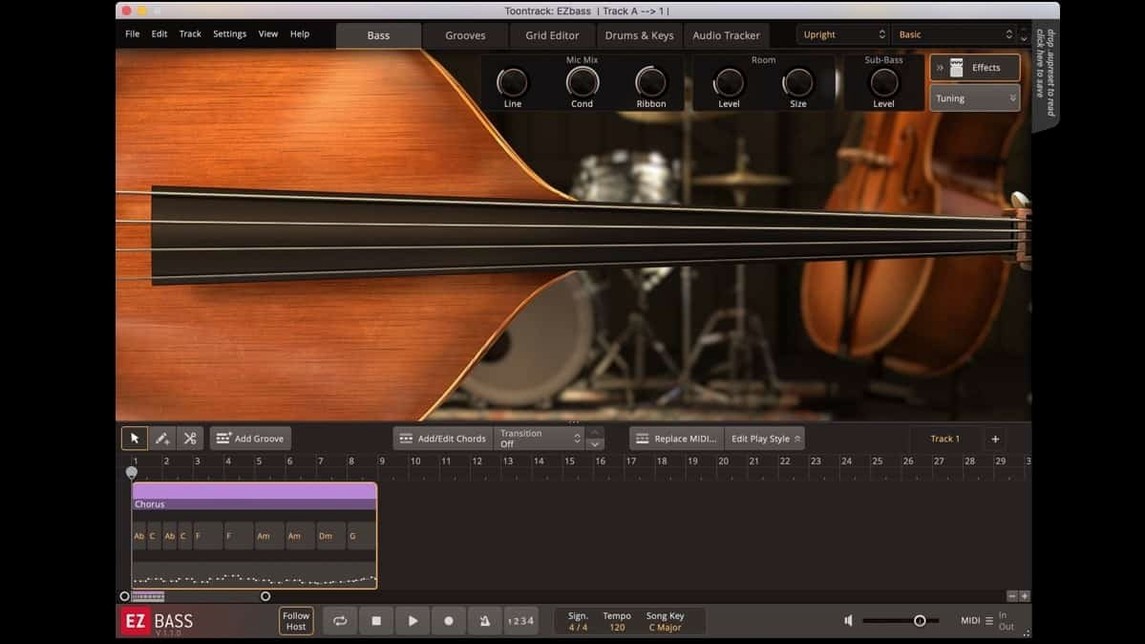
If you've ever used EZdrummer to lay down a quick drum track, you already have a feel for how EZbass works. It's the same Toontrack approach: pick a style, drag in a pattern, then tweak until it sits. Version 1.3.3 adds right-hand mute articulation from the Rock Legend EBX, so your bass part can sound like a player who actually knows when to lay off the string.
Two sampled basses and drag‑and‑drop note editing
The interface keeps things where you expect them. The main panel lets you generate bass parts from drum or keyboard MIDI, then rearrange notes without leaving the plugin. There are two sampled instruments — one vintage, one modern — and the amp and pedal section lets you dial in anything from a clean DI to a driven rock tone. The mix slider on the output stage is handy: you can push the bass forward or tuck it behind the kick without touching your DAW's fader.
Mute articulation, custom shortcuts, and updated Mac icons
Beyond the new mute articulation, this update lets you reassign keyboard shortcuts in Settings, which saves time when you're deep in a workflow. The Mac icons have been updated to the macOS Tahoe style, and menu clicks should behave properly in newer Apple hosts. It runs on both Intel and Apple Silicon Macs, as long as you're on macOS 10.15 or later. The installer is a straightforward disk image mount and run — no surprises.
Fixing a bassline that doesn't match your track
A few things tend to trip people up when they first start working with EZbass. The good news is the fixes are usually simple once you know where to look.
One recurring issue is the generated bassline not matching the feel of your drum track. The plugin works from drum or keyboard MIDI, so if your drum part has a lot of swing or unusual accents, the bass might come out a bit stiff. The trick is to go into the pattern editor after generation and nudge a few notes. Slide the velocity of the downbeats up, pull the ghost notes down, and suddenly it locks in. You don't need to rewrite the whole thing — just a handful of tweaks makes it sound like a real player reacting to the drummer.
Another snag crops up with audio export at sample rates above 44.1 kHz. Version 1.3.3 fixed a timing issue there, so if you'd been avoiding higher sample rates, now is the time to try again. Export a short phrase at 48 kHz or 96 kHz and check the transient alignment against your grid. The fix should keep everything tight.
Sometimes the right-hand mute articulation doesn't appear where you expect it. That feature is tied to the Rock Legend EBX expansion, so it won't show up in the core library. If you have that expansion installed and still don't see the articulation, make sure you're looking at the correct key switch map. The mute is triggered by a specific note, and the mapping is listed in the articulation reference inside the plugin. One quick glance at that table saves you five minutes of clicking around.
A final common frustration: the MIDI drag-and-drop doesn't always land on the right track in your DAW. EZbass sends the MIDI out on a specific channel, and if your DAW's track is set to receive on a different channel, nothing happens. Set the receiving track to Omni or match the channel, and the bass pattern drops in as expected.
Starting with a drum loop and the modern bass
Start with a drum loop or keyboard part already in your session. Load EZbass on a new instrument track and select the modern bass — it sits well in most pop and rock mixes without much coaxing.
Drag the drum MIDI into the bass part generator. The plugin analyses the kick and snare hits and produces a pattern that follows the rhythmic shape. Listen once through. Most of the time the root notes are right, but the phrasing might be a bit busy. Open the pattern editor and thin out the sixteenth-note runs — keep the ones that hit on the kick and let the rest breathe. You want the bass and kick to move together, not fight for the same space.
Switch to the vintage bass for the verse section. Its warmer tone sits underneath without poking out. Generate a new pattern from the keyboard MIDI this time, because the verse has a chord progression that needs clearer root movement. The vintage bass tracks the chord changes nicely, and the amp model adds just enough grit to cut through a sparse arrangement.
Copy the verse pattern to the chorus and swap back to the modern bass. Raise the mix slider by a couple of dB so the chorus feels bigger. Add a little drive from the pedal section — just enough to thicken the attack, not so much that the low end turns to fuzz. The chorus hits harder without you having to touch any EQ.
Export the MIDI to your DAW for the final arrangement. You can still tweak the amp settings inside the plugin while the MIDI plays back from your DAW's timeline. That way you keep the flexibility of the sampled instrument without being locked into one performance.
Building a rock bass part from scratch with existing drums
I had a track open last week that needed a bass part from scratch. The drums were already done — a straightforward rock beat with a solid kick on the one and three. I loaded EZbass on a new track, selected the vintage bass because the song had that late-sixties feel, and dragged the drum MIDI into the generator. The first pass was usable: the root notes followed the kick pattern, and the phrasing was simple. But the verse needed something a bit more melodic, so I switched to generating from the keyboard MIDI instead.
The keyboard part had a descending chord progression, and the bass generator picked up the root movement cleanly. I opened the pattern editor and moved a couple of notes to the octave below for the turnaround — nothing dramatic, just a little more weight at the end of the phrase. The amp model was set to a clean DI with a touch of compression from the pedal section. It sat behind the kick without competing.
For the chorus I duplicated the verse pattern and swapped to the modern bass. The tone was punchier, and I added a bit of drive to push it forward. The mix slider went up about 3 dB, and suddenly the chorus had the lift I wanted. I didn't touch any EQ or compression in the DAW — the amp section handled all of that inside the plugin.
When I exported the MIDI to my DAW's timeline, the bass pattern played back exactly as I'd set it. I bounced the audio in place, checked the export at 48 kHz — the timing fix in version 1.3.3 held up, no drift on the transients. The whole process took maybe twenty minutes, and most of that was listening and deciding, not wrestling with the software. That's the point, really: get the idea down, shape it, and move on to the next part of the arrangement.
New this release
- Added support for right-hand mute articulation used in Rock Legend EBX
- Added support for changing some keyboard shortcuts in Settings
- Updated Mac icons to macOS Tahoe style
Mac it needs
- macOS 10.15 or later
- Intel or Apple Silicon (ARM) 64-bit processor
Installing on a Mac
- Mount the downloaded disk image.
- Run the standard installation procedure.
Notes from photographers
Sign in or create your account to leave a comment.
No notes from photographers yet. If you have used this on a real folder, say which camera and which Mac.