Get it for my Mac (17 MB)
 Effectrix
1.4.8
Effectrix
1.4.8

- Version
- 2.5.0
- Developer
- zPlane.development
- Interface in
- English
- Licence on file
- k'ed by Team V.R
- macOS it runs on
- macOS 10.15 or later
- Chip support
- Apple Silicon, Intel 64-bit
In the edit
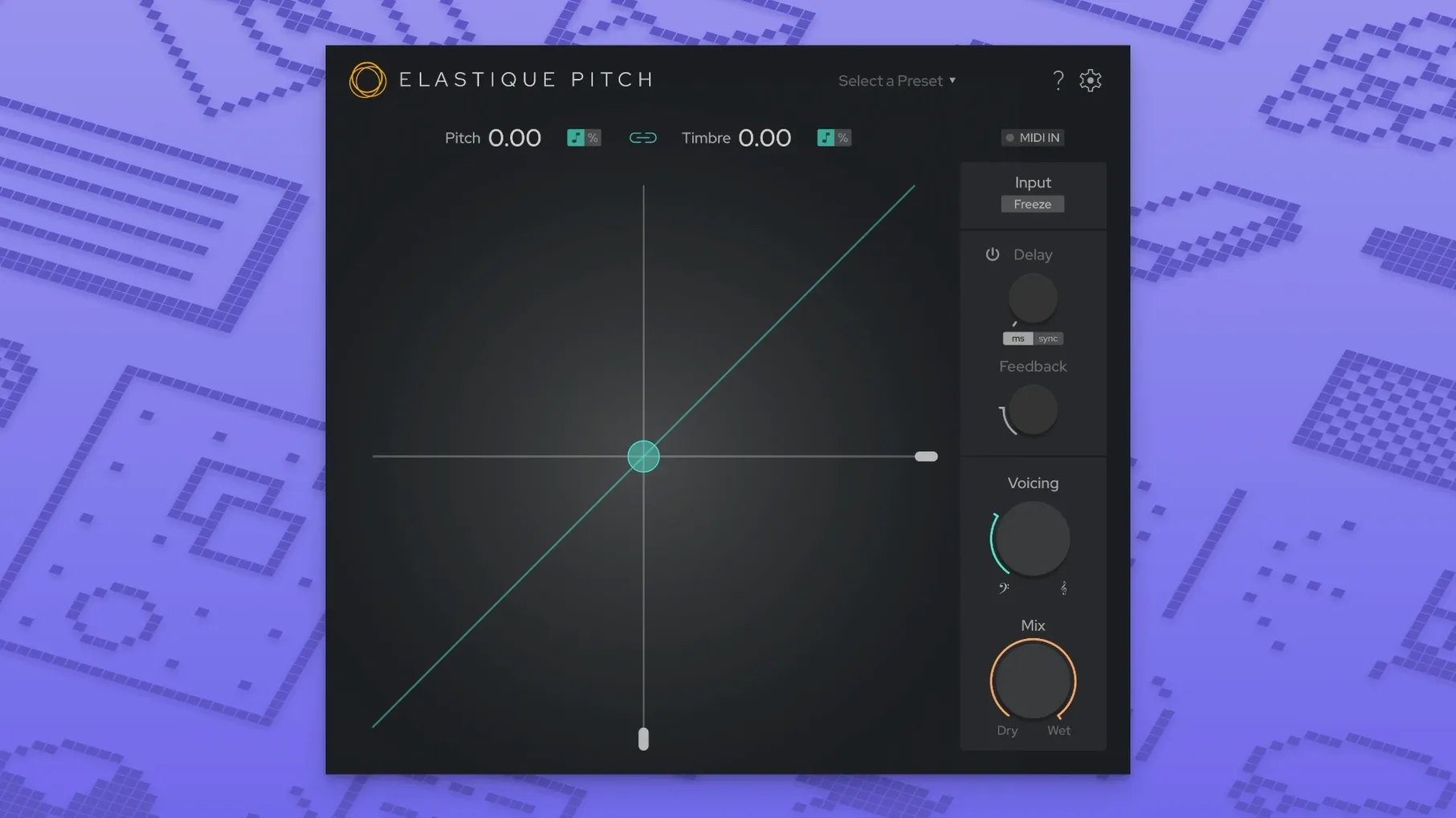
elastiquePitch is a real-time pitch-shifting plug-in that lives on tracks, buses and aux channels in your Mac DAW. You can change pitch and timbre independently, which is useful when a vocal needs a different character without shifting its key, or when you want a synth part to sit differently in the mix without losing its original texture. Version 2.5 brings a redesigned user interface that makes the controls easier to read during a long session, plus expanded multichannel support up to 16 channels for larger arrangements. The latest ÉLASTIQUEPRO algorithm handles the processing, and the plug-in can also produce pitch-shifted echo effects when you route it through a send. It is a 64-bit plug-in that runs on both ARM and x86 Macs under macOS 10.15 and later.
Getting oriented in the first few days
When you first load elastiquePitch onto a track, spend a moment with the pitch and formant controls turned to something obvious — say, +5 semitones and a formant shift down by a few steps. That makes it immediately clear which knob does what. The redesigned interface in version 2.5 puts the main parameters front and centre, so you are not hunting through menus.
A good early test is to drop the plug-in on a simple spoken-word clip. Move the pitch up by an octave and listen to how the formant follows (or doesn't). Then dial the formant back toward zero while keeping the pitch shift. You will hear the voice stay high but sound more natural. That is the separation that makes elastiquePitch worth keeping on the insert list.
Try the freeze grain function on a sustained note. It captures a short slice of audio and holds it, which can turn a single guitar chord into a drone or a breath into a pad. It is not something you will use on every session, but knowing it is there saves you reaching for a separate granular tool.
A quick vocal tuning workflow
Let us walk through a common task: fixing a vocal take where a few notes drifted flat. This is the kind of thing elastiquePitch handles without leaving your main arrange window.
- Insert elastiquePitch on the vocal track as an insert effect. Make sure the track is in a format the plug-in can see — the 64-bit AU or VST3 version works with most modern DAWs.
- Play through the take and identify the flat sections. You can automate the plug-in's pitch parameter, so draw in automation lanes for pitch shift on your DAW's timeline.
- Set the pitch shift to +20 or +30 cents (0.20 to 0.30 semitones) for the notes that need correction. Keep the formant control at its default or nudge it very slightly if the correction makes the voice sound thin.
- If the vocal is part of a stereo or multichannel arrangement, check that your track routing matches the plug-in's channel count. Version 2.5 supports up to 16 channels, but a standard stereo vocal needs only the default stereo mode.
- Add a small amount of pitch-shifted echo by sending the track to an aux with elastiquePitch set to a different pitch and a short delay time. Blend it underneath the dry signal for width.
The key is automation. elastiquePitch responds well to parameter changes mid-note, so you can ride the pitch in real time if you prefer writing automation while playing the track back.
Shift pitch and keep the voice sounding natural
The formant shift works independently from pitch, which is the headline feature, but it also means you can adjust a voice's perceived size without changing the key. A male voice shifted up in pitch can be made to sound younger by leaving the formants high, or older by dropping them. That is useful for dialogue work and podcast production as much as music.
Because elastiquePitch supports VST3, AU and AAX natively, you can move a session between Logic, Pro Tools and Cubase without swapping plug-ins. The same instance behaves the same way in each host.
The freeze grain function is worth a second look. It is not just for ambient textures. On a percussive sound, freezing a single transient and then pitching it down can create a sub-hit that layers under the original kick. It is one of those features you forget about until you need exactly that sound.
Fix the plug-in not showing up in your DAW
The plug-in does not appear in my DAW's list. Check that you installed the correct format for your host. If you use Logic, you need the AU version. For Cubase or Studio One, VST3 is the usual choice. Pro Tools requires AAX. The installer places all three formats, but your DAW might be scanning a different folder. Restart the DAW after installation and, if necessary, rescan plug-ins from the DAW's preferences.
Pitch changes sound glitchy or warble. This usually means the source material has a lot of background noise or reverb that the algorithm is trying to process. Reduce any room sound before the plug-in, or use elastiquePitch on a cleaner section of the track. The ÉLASTIQUEPRO algorithm is designed for clarity, but it works best when the input is not already heavily processed.
Multichannel mode seems inactive. If you have a 5.1 or 7.1 session and the plug-in only shows stereo options, check your track's channel count. elastiquePitch 2.5 supports up to 16 channels, but the track itself must be set to the correct bus format. Create a multichannel track in your DAW first, then insert the plug-in.
Freeze grain does not hold the sound I expected. The freeze captures whatever is playing at the moment you engage it. If the source is very short or has a fast attack, try freezing on a sustained part of the note. You can also automate the freeze on and off to create rhythmic stutters.
Formant shift sounds unnatural on certain voices. Extreme formant shifts can push a voice into cartoon territory. For subtle work, keep the shift within a few steps of zero. If you need a dramatic effect, try combining a small formant shift with a larger pitch shift — that often sounds more musical than moving both parameters to their extremes.
New this release
- Redesigned user interface
- Expanded multichannel support up to 16 channels
- Uses the latest ÉLASTIQUEPRO algorithm
Mac it needs
- macOS 10.15 or later
- 64-bit compatible DAW
- Intel or Apple Silicon processor
Questions I actually get
Can elastiquePitch run on Apple Silicon Macs?
Yes, version 2.5 supports both ARM and x86 architectures, so it works natively on Apple Silicon and Intel Macs.
Installing on a Mac
- Open the downloaded disk image.
- Run the standard installation procedure.
Notes from photographers
Sign in or create your account to leave a comment.
No notes from photographers yet. If you have used this on a real folder, say which camera and which Mac.