Get it for my Mac (786 MB)
 EZbass
1.3.3
EZbass
1.3.3
- Version
- 3.1.2
- Developer
- Toontrack
- Interface in
- English
- Licence on file
- k'ed by Team V.R
- macOS it runs on
- macOS 10.15 or later
- Chip support
- Apple Silicon, Intel 64-bit
In the edit
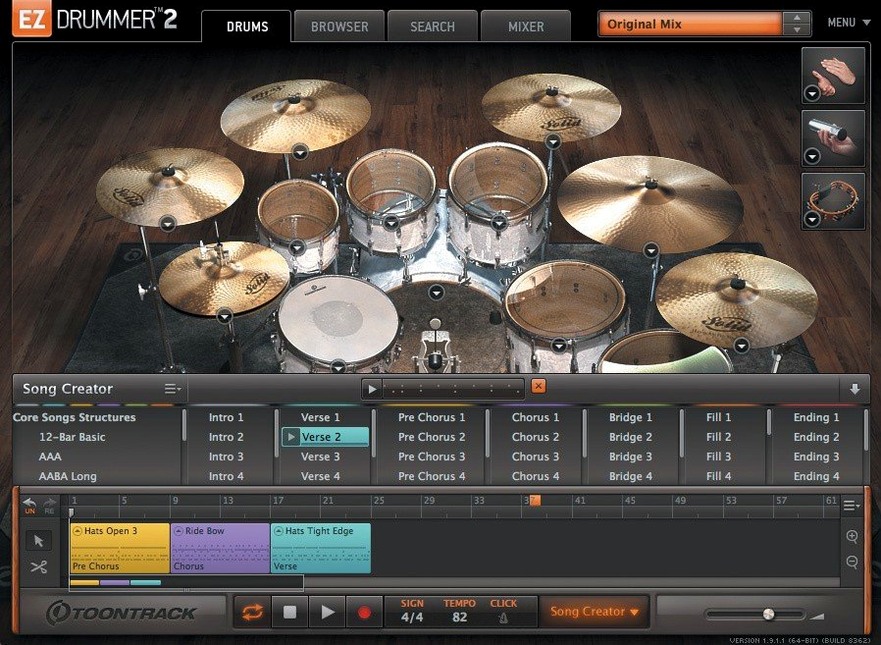
If you already reach for a virtual drummer when a track needs a backbone, EZdrummer 3 is the version that turns that sketch into a finished arrangement. The core library gives you mix-ready presets, a MIDI groove browser you can preview and star, and the Song Creator that takes a simple idea and builds a full song structure around it. Drag a groove to the song track, open the Grid Editor to write a custom pattern, and you’ve got a drum track that follows the arrangement without endless tweaking.
Songwriters moving from a loop to a complete song quickly
- Songwriters who want to move from a loop to a complete song quickly
- Producers who need mix-ready drum sounds without spending hours on processing
- Anyone building drum parts from scratch with the built-in Grid Editor
Version 3.1.2 required for EZX expansions from Q4 2025 onward
- Version 3.1.2 is required for EZX expansions released from Q4 2025 onward
- Hi-hat pedal and other CC recording on the song track was fixed in this version
- The standalone and project icons now follow macOS Tahoe style
Written more for music writers than drum mixers
EZdrummer 3 is built with a specific kind of Mac user in mind: someone who writes music more than they mix drums. If you spend your days in a DAW building arrangements, sketching out song structures and layering parts, this is the tool that lets you think about the kick and snare as song elements rather than as samples to tweak. Songwriters who work quickly — the kind who block out a verse and chorus in a single session — will appreciate how fast you can cycle through presets and grooves without ever opening a mixer. Producers who handle genre work, from rock and pop to indie and metal, get seven kits and three rooms that cover a lot of ground before you even reach for an EZX expansion. Drum programmers who prefer to build patterns by hand will live in the Grid Editor, but the real win is for the person who wants to generate a drum track from an audio reference or a tapped rhythm and then edit it into something personal. Casual Mac users who only need a basic beat now and then might find the library deeper than they need, but anyone who writes regularly will grow into it.
Works standalone or inside a DAW
People often ask whether EZdrummer 3 works as a standalone app or only inside a DAW. It does both: you can open it on its own to build a drum track and export it, or you can run it as a plug-in inside Logic, Ableton Live, Pro Tools, or any host that supports VST, AU, or AAX. Another common question is how the MIDI grooves work with your own song. The groove library is organised by style and time signature, and each groove can be previewed in real time before you drag it to the song track. Once it's there, you can rearrange parts, copy sections, and swap grooves in and out without losing the arrangement. People also wonder about the difference between the included library and the EZX expansions. The core library gives you seven kits, three rooms, and a solid range of presets, which is enough for a lot of projects. The expansions add specific kit sounds and genre-focused MIDI, and version 3.1.2 is the minimum needed for expansions released from Q4 2025 onward. Some users ask about the Tap2Find feature and whether it actually works with any rhythm. You tap a pattern on a key or pad, and the library returns grooves that match the feel. It is not perfect for every tempo, but it gets you close fast, and you can refine the search by adjusting the timing sensitivity. Finally, people ask about the Bandmate feature and whether it works with audio from any source. You drag an audio file or a MIDI clip onto the Bandmate window, and it analyses the performance to suggest a matching drum part. It works best with clear rhythmic material — a guitar strum or a synth loop — rather than ambient or sparse audio.
Icons now match macOS Tahoe style
- Icon update. The standalone app and project icons now use the macOS Tahoe style. If you keep EZdrummer in your Dock or use Quick Look, it blends in with the rest of the system icons on newer macOS versions. No functional change, but it looks consistent.
- Infinity Grid EZX improvements. Internal changes were made to support the Infinity Grid EZX. If you own that expansion, the grid-based sequencing behaves more predictably when you edit patterns or switch between views.
- Song-track CC recording fixed. Before 3.1.2, recording hi-hat pedal movements and other continuous controller data on the song track could fail or behave unexpectedly. That is now working as intended, which matters if you automate hi-hat articulation or other CC-based expression during a performance.
- Mixer Solo and Mute recall fixed. Toggling Solo or Mute in the mixer used to clear the opposite recall state. If you had a channel soloed and then muted another, the solo state could drop. That is resolved, so your mixer settings stay intact as you work.
Drag a demo track onto Bandmate for groove suggestions
Start with an audio file of a demo guitar or synth part. Drag it onto the Bandmate window — EZdrummer analyses the performance and suggests a groove that fits the tempo and feel. Listen to a few suggestions and pick the one that matches the energy you want. If the groove is close but not quite right, use Edit Play Style to adjust the intensity or complexity in real time without changing the pattern. You can go from a sparse verse feel to a fuller chorus part with a single slider.
Once the basic groove is on the song track, open the Grid Editor to write a custom fill or adjust the kick pattern for the transition into the chorus. The Grid Editor works like a piano roll, so you can place hits exactly where you need them. If you prefer to work from existing material, browse the MIDI groove library by style and drag complementary grooves into the song track. Star the ones you use often so they appear at the top of the list next time.
When the arrangement is ready, use the Song Creator to extend the idea into a full song structure. It can generate verses, choruses, bridges, and fills based on the groove you started with. You can then cut, copy, and paste parts in the song track to refine the structure. If you want a percussion layer on top of the kit, add percussion from the included library and adjust the level in the mixer. The whole process stays inside EZdrummer — you do not need to switch back to your DAW until the drum track is ready to export.
Building a full pop-rock demo drum track in a day
A producer I know works on demos for a pop-rock act. They get a rough guitar and vocal track from the artist and need to send back a full arrangement within a day. Opening a drum library and building a kit from scratch is not an option when the deadline is tight. They open EZdrummer 3, drag the guitar track onto Bandmate, and within a few minutes they have a groove that fits the tempo and the strumming pattern. They use Edit Play Style to pull the verse back and push the chorus forward. Then they open the Song Creator and let it build a full structure — intro, verse, pre-chorus, chorus, bridge, outro. They cut a few sections and swap a fill from the MIDI groove library. The drum track is ready in under thirty minutes, and they can send the demo to the artist with a mix-ready drum sound that does not need any additional processing. The artist hears a finished arrangement, not a placeholder beat, and the producer saves the time they would have spent programming each hit manually. That is the kind of use case EZdrummer 3 was made for — getting from a rough idea to a complete song track without losing momentum.
New this release
- Standalone and project icons updated to macOS Tahoe style
- Internal improvements added for Infinity Grid EZX
- Fixes for song-track CC recording and mixer Solo/Mute recall states
Mac it needs
- macOS 10.15 or later
- Intel or Apple Silicon Mac
- English interface
Questions I actually get
Can I use EZdrummer 3 with EZX expansion packs released after Q4 2025?
Yes, but you need version 3.1.2 or later. Older versions won’t support those expansions.
Installing on a Mac
- Mount the downloaded disk image.
- Run the standard installer and follow the prompts.
Notes from photographers
Sign in or create your account to leave a comment.
No notes from photographers yet. If you have used this on a real folder, say which camera and which Mac.