Get it for my Mac (7.3 GB)
 UnderTone Audio UnFairchild
1.0.8
- Version
- 2.3.1
- Developer
- uJAM
- Interface in
- English
- Licence on file
- K'ed by MORiA
- macOS it runs on
- macOS 10.15 or later
- Chip support
- Apple Silicon, Intel 64-bit
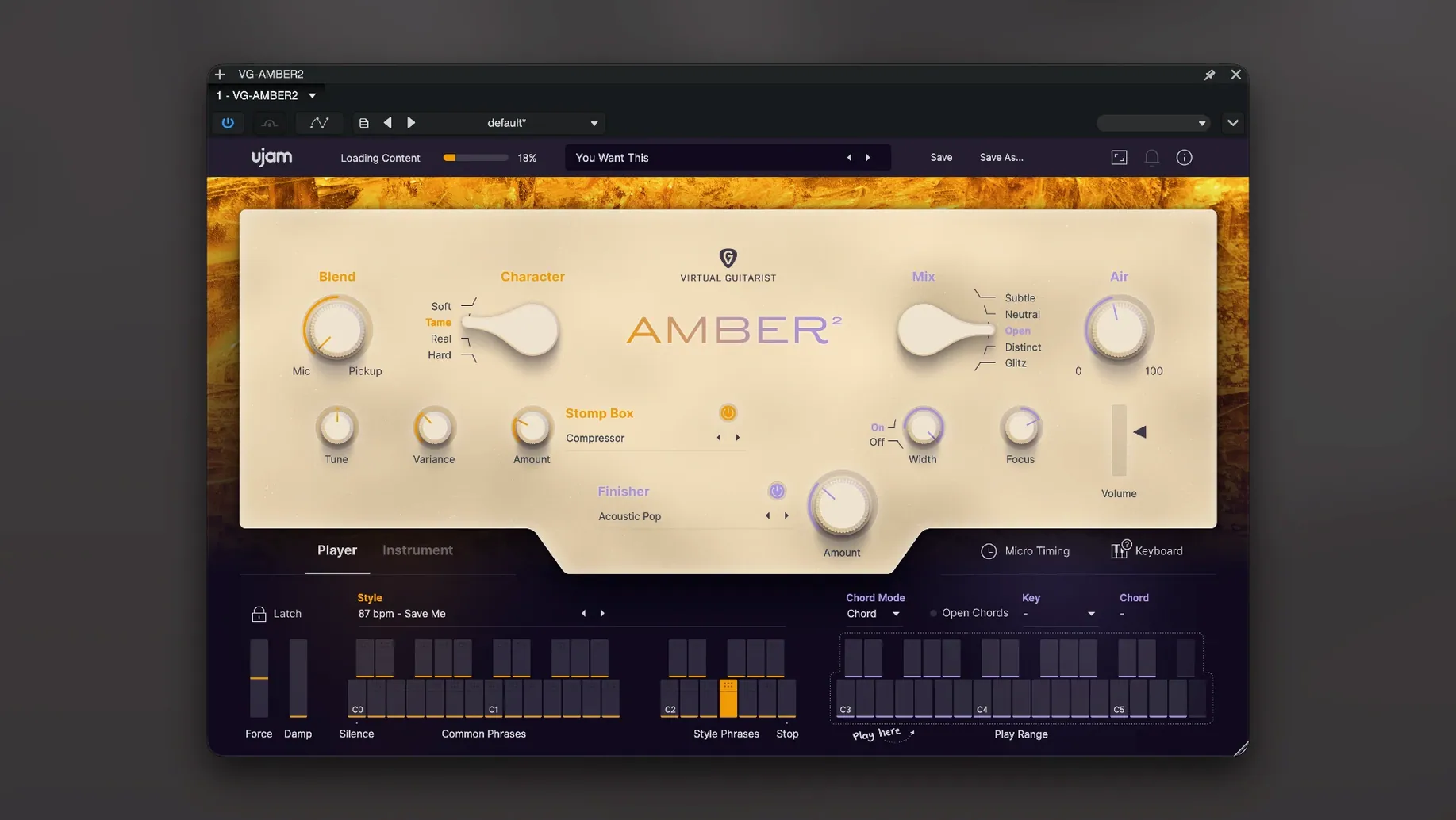
In the edit
Over 30 styles and more than 350 phrases sit inside this steel-string acoustic guitar plug-in, which makes it a solid choice when you need a believable strum or picked part without tracking a real instrument.
Instrument Mode — plays the guitar like a virtual instrument, so you can hold chords and control the feel with your keyboard or MIDI controller.
Open Chords — adds variety by swapping some voicings for open strings, giving you a wider, more organic sound, especially for picking over strumming.
Phrases — over 350 performance-based patterns across the styles, all newly recorded, so you can drag and drop MIDI straight into your arrangement.
Finisher FX — 60 effect modes that shape the tone, from subtle room ambience to lo-fi character, without opening another plugin.
Performance Controls — Pitch Bend, Modulation and Sustain Pedal data work as optional touches for real-time variation, letting you push a note or let a chord ring.
Sound Source — handpicked microphones and extra recorded sources expand the palette beyond a single pickup sound.
One quick relaunch after loading fixes the silent first start
The first time you open the plug-in, it needs a second launch to work properly. Load it once, close it, then open it again — the sound content registers after that initial spin. It is a one-time thing, so do not worry if the first attempt feels quiet or empty.
If you are not hearing the Stompbox effects or Finisher FX, check that the effect section is switched on in the interface. It is easy to toggle it off while browsing presets. Also make sure your DAW’s track is receiving MIDI notes — Amber 2 needs MIDI input to produce sound; it will not play by itself.
When dragging and dropping MIDI phrases into your arrangement, drop them onto a MIDI track that already has the plug-in loaded. If you drop onto an audio track, nothing happens. The phrase will appear as a MIDI clip that you can edit or loop afterwards.
Instrument Mode lets you play the guitar live from your keyboard
The jump to 2.3.1 brought a few useful additions that affect everyday use.
- Instrument Mode — this is new for the series. Instead of relying only on pre-built phrases, you can now play the guitar part live from your keyboard. Hold a chord and the plug-in decides the strumming pattern. It changes how you build a track from scratch.
- Open Chords — also new. It shifts some chord voicings to include open strings, which sounds more natural when you want a picked part or a softer verse section. It works alongside the existing styles.
- MIDI drag and drop — you can now grab any phrase from the browser and drag it onto a track as MIDI data. That means you can edit individual notes, change the timing, or copy the pattern to another instrument. It saves time when you want to tweak the performance after the fact.
- Complete sound re-record — the guitar model and all phrases were recorded fresh for this version. If you used the original Amber, the tone and response are noticeably updated here.
These changes make version 2.3.1 feel more like a playable instrument than a phrase player, especially when you combine Instrument Mode with the new Open Chords feature. The drag-and-drop addition also keeps the workflow inside your DAW without extra steps.
The interface stays clear and simple, which helps when you are mid-edit and just want the part to sit in the mix.
New this release
- Instrument Mode added
- Open Chords added for more variety and picking over strumming
- Guitar model and phrases completely updated
- Sound content newly recorded
- MIDI drag and drop for phrases added
Mac it needs
- macOS 10.15 or later
- Intel or Apple Silicon Mac
- Works with Logic Pro, GarageBand, Cubase, Ableton Live, Pro Tools, FL Studio and Studio One
Questions I actually get
Does Virtual Guitarist AMBER 2 work with my DAW?
It supports Logic Pro, GarageBand, Cubase, Ableton Live, Pro Tools, FL Studio and Studio One, as long as your Mac runs macOS 10.15 or later.
What is new in version 2.3.1?
Instrument Mode and Open Chords were added, the guitar model and phrases were completely updated, and the sound content was newly recorded. MIDI drag and drop for phrases is also included.
Installing on a Mac
- Open the plug-in twice the first time you use it.
- Follow the installation and activation instructions included in the package.
Notes from photographers
Sign in or create your account to leave a comment.
No notes from photographers yet. If you have used this on a real folder, say which camera and which Mac.