Get it for my Mac (2 MB)
 djay Pro
5.6.10
djay Pro
5.6.10

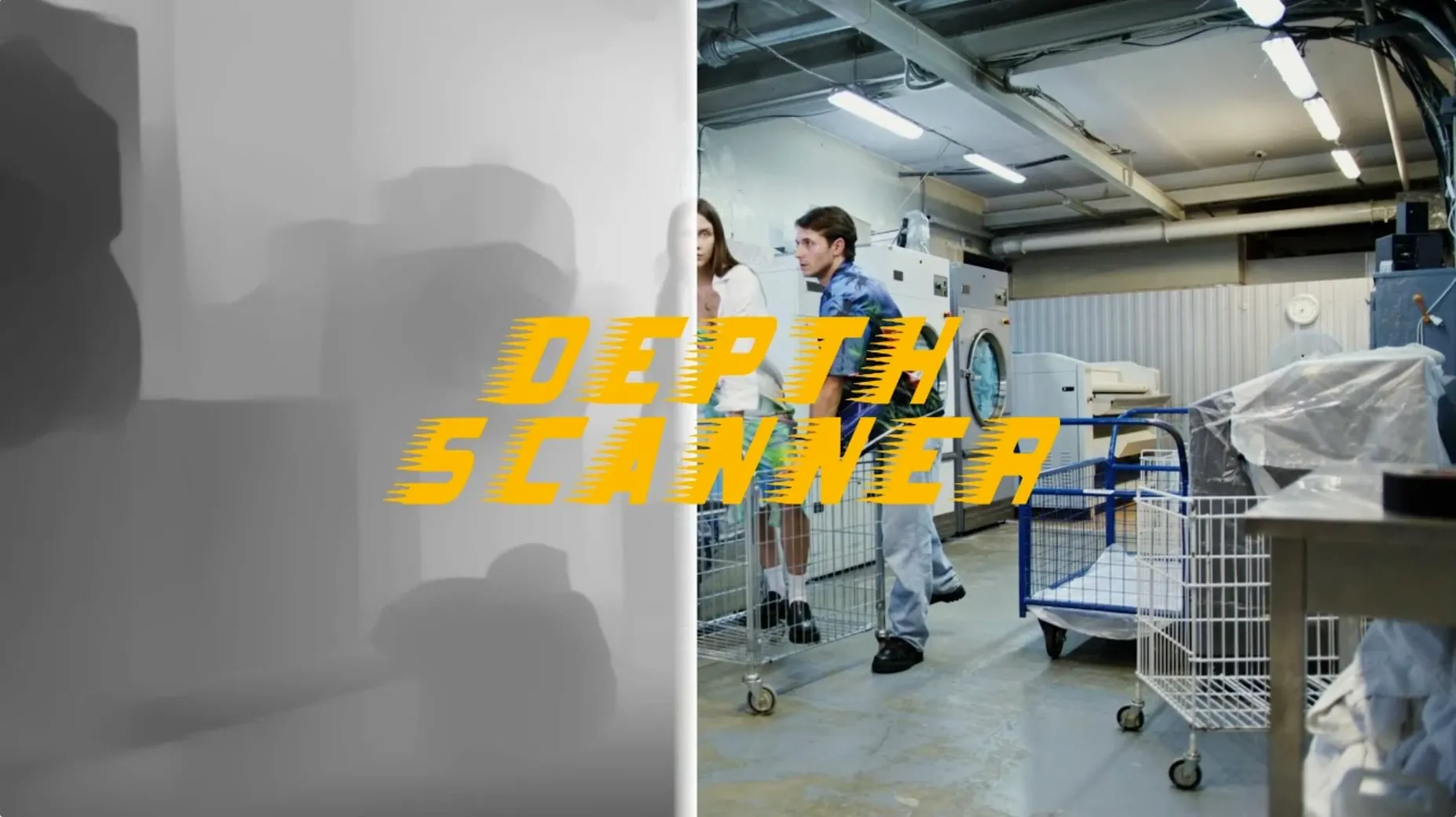
You have a flat video clip or a still photo, and you want to give it depth — a 3D parallax move, a believable fog pass, a Z‑depth channel for compositing. Depth Scanner from Blace Plugins is the After Effects plugin that builds a depth map from what is already on your timeline.
How it works — it analyses each frame and figures out which parts are closest to the camera, then outputs a greyscale depth map.
Where it sits in a session — you drop it on a clip or a pre‑comp, let it process, then pipe the depth channel into a camera move or a Z‑blur effect. It works on both video clips and photographs, so it fits whether you are faking a 3D camera move on a still or pulling depth out of a drone shot.
What you get — a clean depth map that you can feed into other effects. One plugin, one job.
Depth Scanner usually behaves itself, but a few things trip people up when they first start using it. The most frequent one is seeing a flat grey map instead of a proper depth gradient. That usually means the clip is too uniform — a blank wall or a flatly lit face with no texture for the AI to read. Try a test frame with clear foreground and background elements first, just to confirm the plugin is working.
Another one I hear about: the depth map flickers from frame to frame. This happens most often with fast motion or quick cuts. Depth Scanner analyses each frame independently, so a sudden change in lighting or composition can produce a jumpy map. The fix is to pre‑render your clip with the plugin applied, then use that rendered depth pass as a locked‑off layer. You lose the ability to tweak settings later, but you gain a stable map.
People also ask why the depth map looks reversed — white where it should be black, and vice versa. The plugin outputs a standard Z‑depth channel where white is near and black is far. If your effect expects the opposite, invert the map with a Levels or Invert effect before feeding it into your blur or parallax setup.
If the plugin does not show up in the Effects & Presets panel after installation, restart After Effects completely. If it still does not appear, check that you placed the plugin file in the correct Plug‑ins folder for your version of After Effects. Depth Scanner works with the standard installation procedure, so a fresh copy in the right folder usually solves it.
Version 1.15.6 is the current build, and the changes from earlier releases are mostly about consistency. The AI model has been refined so that depth edges — where a person meets the background, for instance — are cleaner and less noisy. In practice, that means less time painting masks to tidy up the map before you use it.
The plugin also handles high‑resolution footage better than older versions did. If you work with 4K or 5K clips, the processing still takes a moment, but the output does not show the blocky artefacts that sometimes appeared in earlier builds. The interface has stayed the same, so if you used Depth Scanner before, nothing about the layout or controls will surprise you.
One task I use Depth Scanner for regularly is building a depth‑based wipe between two clips. Here is the full run from start to finish.
Start with two clips on the timeline, one above the other. The top clip is the one you want to transition out of. Apply Depth Scanner to the top clip and let it generate the depth map. You will see the greyscale output in the layer panel once it finishes.
Next, apply the Effect menu’s Compound Blur (or a similar blur effect that accepts a layer as a blur map) to the top clip. Set the blur map layer to the same clip that has Depth Scanner on it, and choose the depth map from the effect controls. Now the blur is driven by distance from the camera — close objects stay sharp, far objects blur first.
Animate the blur amount from 0 to a high value over the duration of the transition. As the blur increases, the background fades into softness while the foreground holds. Then crossfade the opacity of the top clip to reveal the clip underneath. The result is a transition that feels like a focus pull rather than a simple dissolve.
For a parallax version of the same idea, skip the blur and instead use the depth map to drive a displacement map effect. Animate the displacement amount and the foreground appears to slide past the background as the transition happens.
Let me walk you through a real session. I had a short drone clip of a coastal path — rocks in the foreground, a long beach leading to cliffs in the distance. The shot was flat, and I wanted to give it a gentle camera push that felt three‑dimensional.
I dropped the clip into a new comp, then applied Depth Scanner from the Effects & Presets panel. The plugin took a few seconds to analyse the first frame, and the depth map appeared as a greyscale image in the composition viewer. The rocks came out white, the beach was mid‑grey and the cliffs faded to near black. That is exactly what I needed.
I hid the depth map layer and duplicated the original clip. On the duplicate, I applied a Camera Lens Blur effect and set its depth map layer to the clip with Depth Scanner. I adjusted the blur radius so the background cliffs softened while the foreground rocks stayed crisp.
Then I created a null object with a 3D camera parented to it. I animated the null’s position slightly — a slow push‑in and a tiny pan to the right. The combination of the fake camera move and the depth‑driven blur gave the flat drone shot a believable sense of volume. The whole process, from import to render, took maybe twenty minutes.
The map was clean enough that I did not need to touch it up. That is the main thing Depth Scanner saves you — the manual rotoscoping or hand‑painted Z‑depth work that used to eat up an afternoon. You drop it on, it does the analysis, and you move on to the creative part.
Yes. Depth Scanner works on video clips and photographs inside After Effects, so you can generate depth maps from either source.
Tip: if the plugin does not appear, check that the file is in the correct plug‑ins folder for your version of After Effects.
Sign in or create your account to leave a comment.
No notes from photographers yet. If you have used this on a real folder, say which camera and which Mac.