
 Get it for my Mac (5 MB)


 Audio Hijack
4.6.1

- Version
- 1.0
- Developer
- attn. Built for focus
- Interface in
- English
- Licence on file
- Included
- macOS it runs on
- macOS 12 or later
- Chip support
- Apple Silicon, Intel 64-bit
In the edit
You already know the camera LED on your MacBook — it lights up when you’re on a call, recording a video, or using an app that needs the camera. Attn LED gives that same little green light a second job: it blinks to tell you something needs your attention, without making a sound or dropping a banner onto your screen.
Set it up so it works when you’re in focus
Open the app and let it sit in your menu bar. It respects macOS Focus and Do Not Disturb, so if you’re already in a deep-work session, the LED won’t bother you. And it knows when you’re on a FaceTime call or any video conference — the blinking stops automatically.
See which app is calling
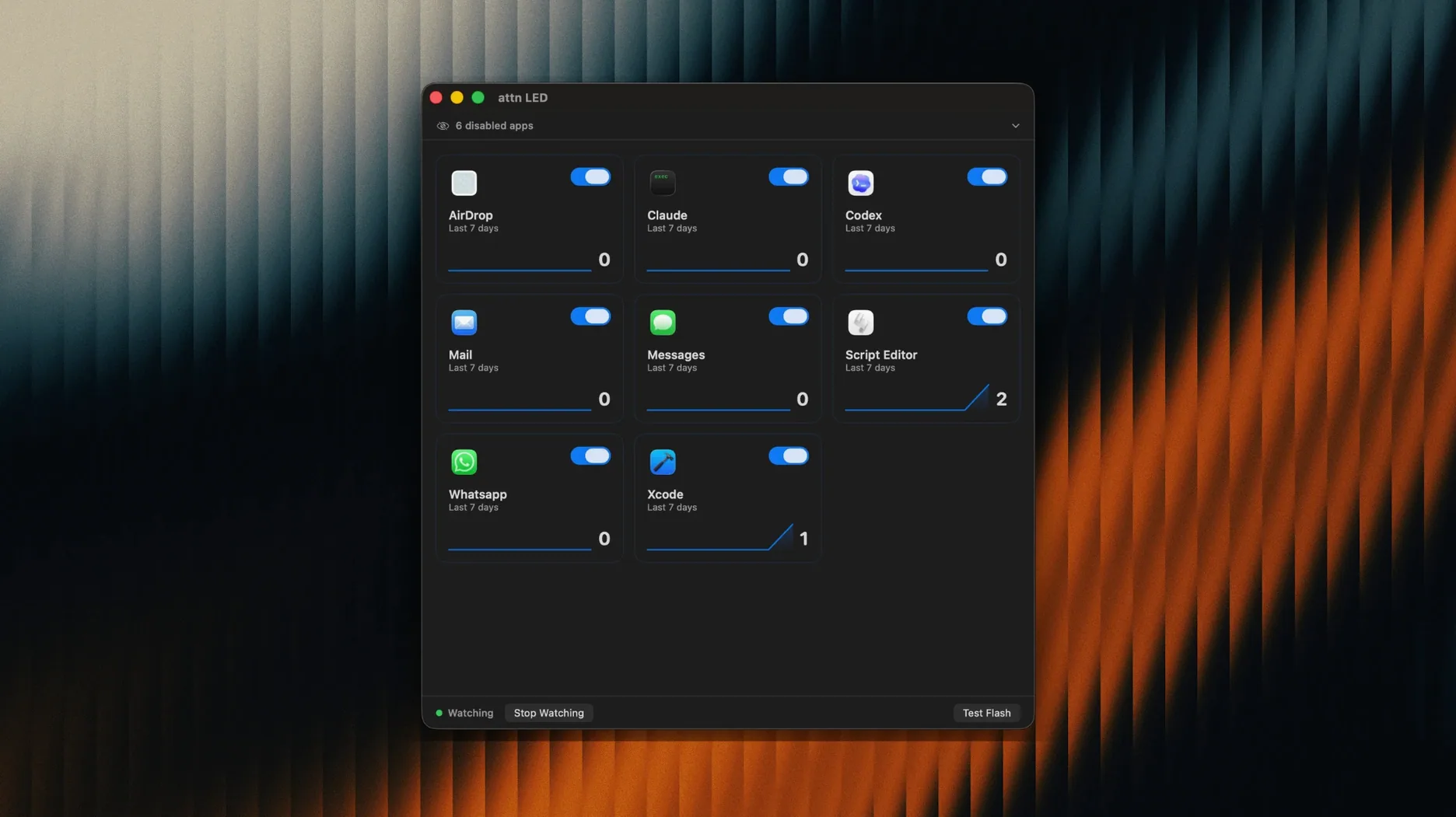
When the LED starts blinking, you know something is waiting. Click the menu bar icon to see which app triggered it. The LED keeps blinking until you open that app, so you don’t miss the reminder if you get pulled into something else.
Check the LED means something new
Once you’ve installed it, the camera light becomes more than a privacy indicator. It’s a physical notification light, right where you’re used to looking. If the LED is on and you’re not in a call, it’s probably Attn LED asking you to look at something.
Attn LED version 1.0 arrived with a few thoughtful touches that make a real difference when you’re buried in work. It watches the macOS notifications database through FSEvents, which is a clever way to catch alerts even when Focus Mode would normally block them. That means if Slack or Messages sends something important while you’re in a deep focus session, the LED still blinks — no sound, no banner, just the light. You decide what’s important enough to break through.
The small conveniences you notice after a week
You can limit LED notifications to specific apps: Slack, Mail, Messages, Discord, Teams, Telegram, or any others you choose. The app also automatically detects new apps that send notifications, so you don’t have to hunt through settings every time you install something. It just works.
The LED keeps blinking until you open the related app. That’s handy when you’re in the middle of editing a batch of photos and can’t stop — the light waits for you. And because the camera LED is visible from anywhere in the room, you can glance over from across the desk and know something needs your attention without reaching for the phone.
When focus modes hide the alerts you actually need to see
If you spend your day with Focus or Do Not Disturb turned on, this app fills a gap. Those modes are great for silencing interruptions, but they can also silence the things you actually want to see. Attn LED gives you a way to let priority messages through without breaking your concentration.
Photographers and designers who work with their MacBook docked or on a desk will find the LED hard to miss. It’s right there above the screen, in your peripheral vision. Sound designers, video editors, or anyone who keeps their Mac muted for long stretches also benefit — no audio cues needed.
And if you share a workspace or work in a quiet environment where notification sounds are rude, the LED is a polite alternative. You see it, nobody else does.
For Mac users who keep an eye on multiple chat apps — Slack for work, Messages for personal, Discord for communities — attn LED helps you spot which one is calling without cycling through windows. The menu bar tells you the source, and the light keeps blinking until you respond.
Mac it needs
- macOS 12 or later
- Apple Silicon or Intel
Questions I actually get
Does the LED keep blinking even after I close the notification?
Yes, the LED keeps blinking until you open the app that triggered the notification. That way you can’t accidentally dismiss it and forget.
Installing on a Mac
- Open the downloaded disk image.
- Drag the app to the Applications folder.
- After copying finishes, launch the app from Launchpad.
- Tip: keep it in your menu bar for quick access to recent notifications.
Notes from photographers
Sign in or create your account to leave a comment.
No notes from photographers yet. If you have used this on a real folder, say which camera and which Mac.
