Get it for my Mac (219 MB)
 iZotope Insight
2.4.0

- Version
- 1.0.0
- Developer
- iZotope
- Interface in
- English
- Licence on file
- K'ed by MORiA
- macOS it runs on
- macOS 13.7 or later
- Chip support
- Apple Silicon, Intel 64-bit
In the edit
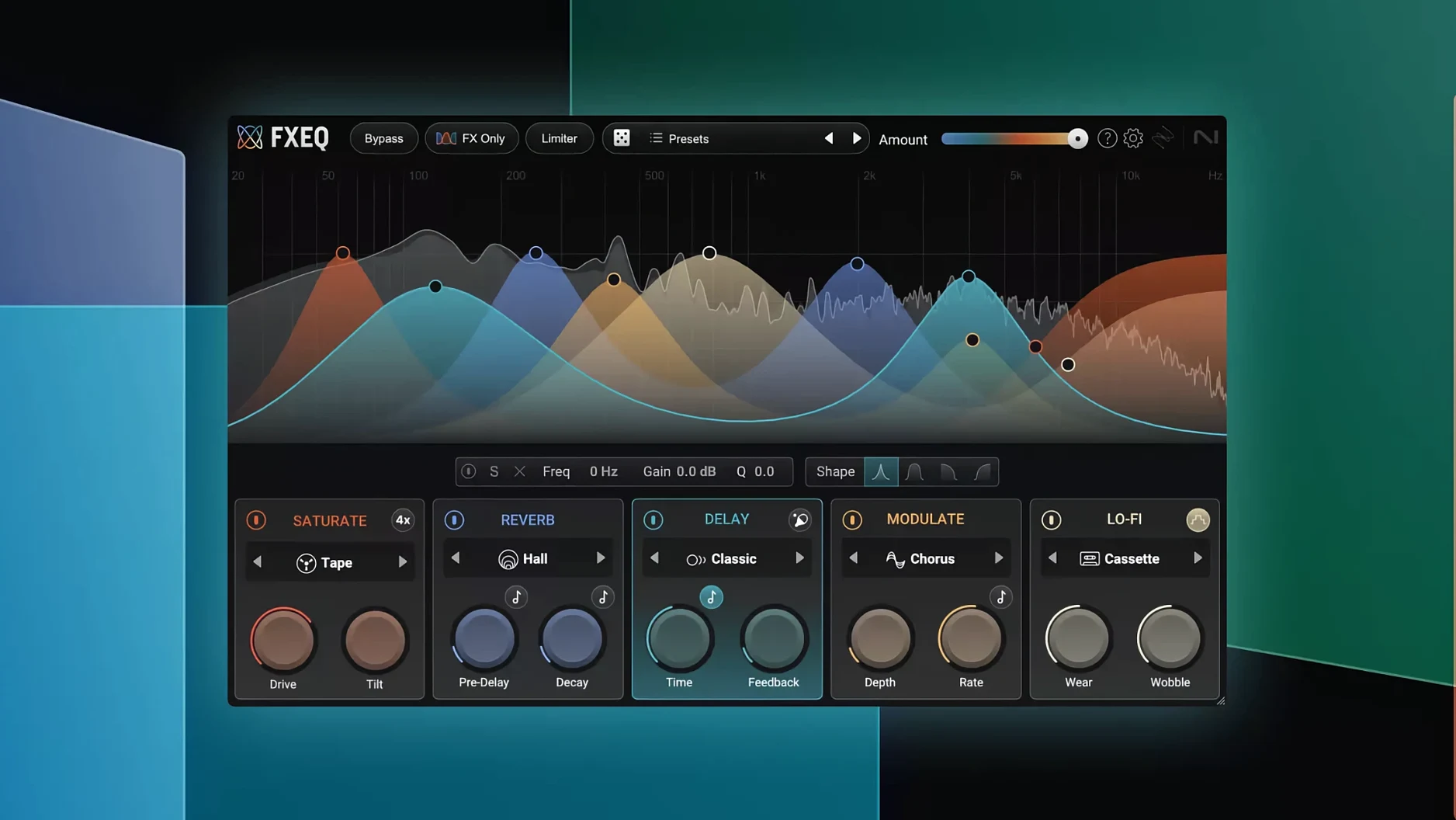
You are mixing a vocal that needs a bit of grit in the low-mids and a touch of air up top. Normally that means two or three plugins, some routing, maybe a send. With iZotope FXEQ you stay inside one EQ-style interface and dial in five different creative effects per band.
Assign effects to frequency bands from the EQ curve
You select a frequency band and assign an effect to it — distortion, dimension, tape, shimmer, or lo-fi. Each effect behaves like its own processor, but you control it from the EQ curve. No extra tracks, no complex chains.
The five effects
Distortion — adds harmonic grit to a selected range. Good for snare body or vocal presence.
Dimension — widens the stereo field on a band without phasing the whole mix.
Tape — introduces saturation and slight compression, like running a stem through a reel.
Shimmer — a bright, reverb-like texture that sits on top of the signal.
Lo-fi — reduces bandwidth and adds noise, useful for contrast in modern pop or hip-hop.
Works on both Intel and Apple Silicon Macs
A few things people tend to ask before they grab FXEQ for the first time. First, yes it works on both Intel and Apple Silicon Macs — no Rosetta worries if you are on an M-series machine. Second, the plugin comes in AAX, AU, and VST3 formats, so it slots into Logic, Pro Tools, Ableton, Cubase, Studio One, Reaper, FL Studio, and a handful of others. If your host only supports VST2, you will need to update or use a wrapper, because VST2 is not included here.
Activation is handled through iZotope Product Portal or Native Access, whichever you prefer. The copy on this site is already prepared, so the standard install routine gets you straight into a session without extra steps.
Rescan your plugin folder if your DAW doesn't see it
The most frequent hiccup is a host not seeing the plugin after installation. A quick rescan of your plugin folder usually fixes it — every DAW has that option somewhere in its preferences. If that does not work, check that your host is scanning the right directories for AU or VST3.
Another thing: FXEQ is 64-bit only. If you are still running an older 32-bit host, it will not load. That is less common these days, but worth confirming if your DAW has not been updated in a while.
Some users find the EQ-style workflow takes a moment to click if they are used to stacking individual plugins. The trick is to start with one band, add an effect, and listen to what it does to that range before layering more. It replaces up to ten individual plugins in one instance, so a little experimentation goes a long way.
Runs natively on macOS 13.7 Ventura and later
FXEQ requires macOS 13.7 Ventura or later — that covers Ventura, Sonoma, and Sequoia. It runs natively on both Intel and Apple Silicon architectures, so performance should feel consistent with your other modern plugins. The interface is an EQ curve with band controls, so expect a visual, hands-on approach rather than a list of knobs.
Given it is part of the Catalyst Series, the design leans into simplicity. You are not managing multiple windows or routing buses — just selecting a frequency and choosing an effect. For pop, electronic, and hip-hop production, that directness saves time when you want drive on a vocal or texture on a drum bus without breaking the flow of a session.
New this release
- Initial release in the Catalyst Series
Mac it needs
- macOS 13.7 Ventura or later
- Intel or Apple Silicon processor
- AAX, AU, or VST3 compatible host
- 64-bit only
- Interface language: English
Questions I actually get
Which hosts does iZotope FXEQ work with?
It supports Logic Pro 11, Pro Tools 2024, Ableton Live 11 to 12, Cubase 13, Nuendo 13, Studio One 7, Reaper 7, FL Studio 21, Audition CC 2024, and Premiere Pro CC 2024.
Is FXEQ compatible with Apple Silicon Macs?
Yes, it runs on both Intel and Apple Silicon Macs, but only in 64-bit hosts.
What effect does the shimmer add?
Shimmer adds a bright, reverb-like texture that sits on top of the signal, giving a sense of air and space without a full reverb tail.
Installing on a Mac
- Run the installer package.
- Follow the on-screen prompts to select your plug-in formats (AAX, AU, VST3).
- Restart your DAW if it was open during installation.
- Scan for new plug-ins in your host if it does not detect them automatically.
Notes from photographers
Sign in or create your account to leave a comment.
No notes from photographers yet. If you have used this on a real folder, say which camera and which Mac.