Get it for my Mac (40 MB)
 Slate Digital Murda Melodies
1.1.1
Slate Digital Murda Melodies
1.1.1

- Version
- 1.0.9
- Developer
- Slate Digital
- Interface in
- English
- Licence on file
- k'ed by GUISEPPE
- macOS it runs on
- macOS 11 or later
- Chip support
- Apple Silicon
In the edit
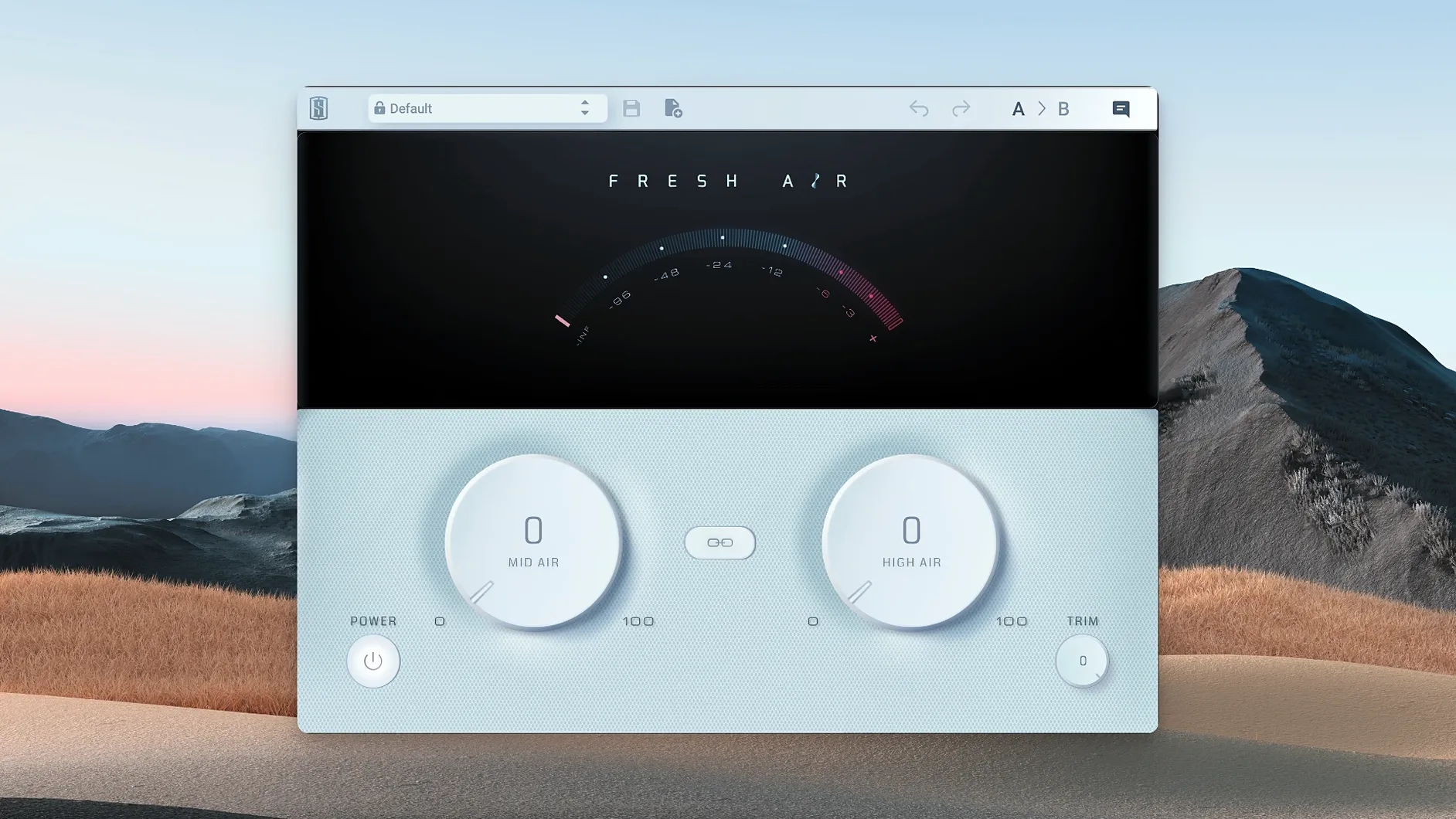
Slate Digital Fresh Air is a dynamic high-frequency processor that adds brightness and air to your tracks without introducing harshness or unwanted artefacts.
What do the two knobs do?
Mid Air controls the upper-mid frequencies, adding presence and body. High Air handles the top end, bringing in shine and air. Together they open up a mix without pushing it into brittle territory.
What is it based on?
Slate Digital says Fresh Air draws from vintage exciter circuits and modern dynamic processing algorithms. That blend gives you the character of old hardware with the control of a contemporary plugin.
Where can you use it?
On individual tracks or the mix bus. A Link button lets you adjust both bands together, which makes it quick to dial in a consistent sheen across a whole session.
Using Fresh Air on a dull vocal in a busy mix
You've tracked a vocal that sits well in the solo but gets lost as soon as the guitars and keys come in. It's not a level problem — push the fader and it fights with the cymbals. The issue is presence. The Link button keeps the ratio steady while you nudge both controls together. The result is a vocal that cuts through without turning into an sibilant mess.
Workflow: brightening a dull acoustic guitar track
Here is a straightforward way to add air to an acoustic guitar that sounds boxy or too warm.
- Insert Fresh Air on the guitar track. Set both knobs to zero.
- Solo the track and play the verse section. Turn Mid Air up slowly until you hear the guitar's body become more defined. Stop when it sounds present but not honky.
- Add High Air in small steps. Listen for the string attack and the room ambience. Beyond that you might hear the pick noise becoming too prominent.
- Use the Trim control to match the output level with the bypassed signal. Fresh Air can push the perceived loudness up, so a quick trim keeps your levels honest.
- Unsolo the track and check it against the full mix. If the guitar now pokes out too much, reduce both knobs together using the Link button rather than pulling them back individually.
This approach works for keys, overheads and any source that needs a lift without EQ surgery.
A subtle sweetener, not a surgical tool
Fresh Air is simple, but a few things can trip you up in the first few sessions.
- The plugin works best as a subtle sweetener, not a surgical tool.
- The mix bus sounds fizzy. Fresh Air on the master can make the whole mix feel airy, but it can also exaggerate harsh frequencies from individual tracks. If it still sounds fizzy, check if your cymbals or hi-hats are already bright before the plugin.
- Level jump when engaging the plugin. The Trim control exists for this reason. After setting Mid Air and High Air, adjust Trim until the engaged and bypassed levels match by ear. You can also use your DAW's output meter to confirm.
- Both knobs feel too sensitive. Small movements go a long way. Use Link if you want to keep the relationship between the two bands while dialling the overall amount down.
Works as a standard AU or VST in any DAW on macOS 11 or later
Fresh Air works as a standard AU or VST plugin, so it shows up in Logic Pro, Ableton Live, Cubase and any other DAW that supports those formats. On a Mac running macOS 11 or later, you can use it alongside built-in tools like the system Audio MIDI Setup for routing or QuickTime Player for quick playback checks. If you use iLok Cloud for activation, Fresh Air stays authorised as long as your internet connection is stable — no dongle needed. For users who prefer a hardware-independent setup, machine activation ties the licence to your specific Mac.
Slate Digital Fresh Air also pairs well with other Slate Digital plugins, but it works just as well on its own. A common chain on a vocal track might be a compressor, then Fresh Air, then a limiter. On the mix bus, Fresh Air before a bus compressor can add air before the compressor reacts to the boosted highs, which gives a different character than putting it after.
For anyone using slate digital mac rutracker, Slate Digital Fresh Air adds clarity and presence to dull audio tracks. Once placed in the correct components or VST folder, your DAW will scan and recognise it on the next launch. Some users search for fresh air torrent or slate digital torrent to find the release, and the version 1.0.9 build by GUISEPPE is the current one for Apple Silicon Macs.
Start with a single track you know well and spend ten minutes moving
Here are a few things worth knowing before you start a serious session with Fresh Air.
- Start with a single track you know well. A vocal or acoustic guitar you have mixed before is ideal. Spend ten minutes moving Mid Air and High Air to learn their ranges. Bypass and compare often.
- Use the Link button early. It helps you hear how the two bands interact before you start fine-tuning them separately. Once you find a sound you like, unlink and adjust each band by a few percent.
- Check your mix on headphones and monitors. Fresh Air can sound flattering on headphones but a little much on speakers. A quick A/B between the two will tell you if you have overdone the top end.
- Apply Fresh Air before your reverb or delay sends. Adding air after time-based effects can make the reverb tails sound exaggerated. Putting it earlier in the chain keeps the effect more natural.
- Do not use it on every track. A little Fresh Air on the mix bus can reduce the need to process individual tracks. Try it on the master first and only add it to specific tracks if something still sounds dull.
Mac it needs
- macOS 11 or later
- Apple Silicon compatible
Questions I actually get
Can Fresh Air work on both individual tracks and the mix bus?
Yes. Slate Digital designed Fresh Air for use on individual tracks or the mix bus, so it can add air to a vocal or brighten an entire mix.
Installing on a Mac
- Follow the standard installation procedure.
Notes from photographers
Sign in or create your account to leave a comment.
No notes from photographers yet. If you have used this on a real folder, say which camera and which Mac.