Get it for my Mac (3.9 GB)
 Spire
1.5.19
Spire
1.5.19
- Version
- 13.0.20-All-in-One
- Developer
- Steinberg
- Interface in
- English
- Licence on file
- Included
- macOS it runs on
- macOS 12 or later
- Chip support
- Apple Silicon, Intel 64-bit
In the edit
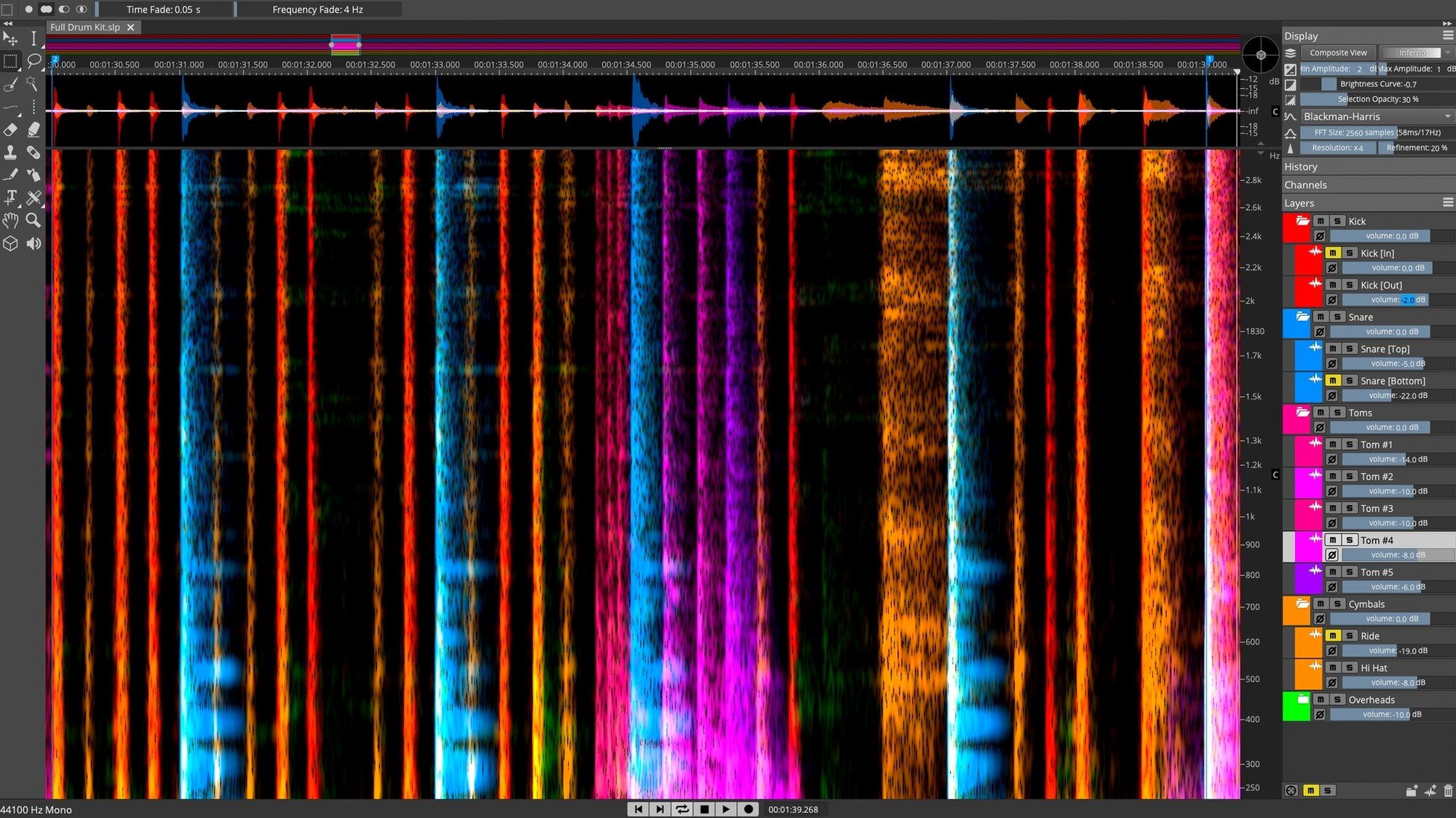
Think of SpectraLayers Pro as the Photoshop of audio — where you can see and sculpt sound itself, not just wave forms. It's the premier spectral editing app for Mac, and here's what its key controls actually do.
What the controls mean
- 3D spectral view — Visualise sound as a three-dimensional landscape, with frequency, amplitude, and time laid out for direct manipulation.
- Direct spectral editing — Paint, erase, or reshape audio data right on the spectral display, much like retouching an image.
- AI-driven separation — Let the software isolate vocals, instruments, or noise using intelligent processes, then fine-tune by hand.
- De-essing tools — Both manual and automatic options to tame harsh sibilance without dulling the rest of the mix.
- DAW integration — Works alongside your main recording software, so you can send audio back and forth without leaving your workflow.
Once you start using SpectraLayers Pro regularly, the spectral display becomes a second pair of eyes. A typical session might begin with a vocal take that has an air-conditioner rumble running underneath. Open the file, switch to the 3D spectral view, and the problem is visible immediately — a low-frequency band of orange and red that stretches across the whole recording. From there, you can select that band with a lasso tool, listen to confirm it's the rumble, and either attenuate or delete it. The whole process takes less time than finding the right plugin in a chain.
Where SpectraLayers Pro splits iZotope RX's territory
iZotope RX is probably the closest competitor in the spectral editing space. RX focuses heavily on repair — de-click, de-clip, de-hum, voice denoise — and its machine learning modules are excellent for cleaning up dialogue and music. Where SpectraLayers Pro differs is in how you interact with the audio. RX feels more like a collection of processors you apply; SpectraLayers Pro feels like a canvas you work on directly. The 3D view in SpectraLayers Pro also makes it easier to see what you're doing rather than relying on presets and sliders alone.
Acon Digital Extract:DX is another tool for separation, but it's a plugin rather than a standalone application. Extract:DX does one thing — unmixing — and does it well, but you don't get the manual editing layer on top. SpectraLayers Pro gives you both the AI separation and the ability to refine the result by hand in the spectral display. If you need to separate stems quickly and move on, Extract:DX might be enough. If you want to see the separation and correct it yourself, SpectraLayers Pro wins.
Melodyne sits in a different category — it's for pitch and timing correction rather than spectral repair. But some users compare them because both let you work on audio in a visual, note-based way. The difference is that Melodyne works on the musical content (notes, pitch, timing) while SpectraLayers Pro works on the sound itself (frequency, amplitude, noise). They complement each other well in a post-production workflow.
Removing traffic hum and a barking dog from one dialogue track
Imagine you have a dialogue recording from a film shoot — there's traffic hum, a dog barking in the distance, and the actor's voice sounds a bit sibilant on the S sounds. Here's how a session might go from start to finish in SpectraLayers Pro.
- Open the file and look at the spectral view. The traffic hum appears as a consistent band across the bottom of the spectrum. The dog bark is a short, bright burst somewhere in the mid-range. The sibilance shows up as thin, high-frequency streaks wherever the actor says an S.
- Use the Voice Denoiser first. This isolates the human voice and lets you reduce the background noise in one pass. The traffic hum drops significantly, and the dog bark becomes quieter but might still be audible.
- Select the dog bark manually. In the spectral display, you can see its shape — a short, jagged patch. Use a selection tool to isolate it, listen to confirm, then either delete it or reduce its level. Because you can see the sound, you won't accidentally cut into the dialogue.
- Apply the de-esser. The automatic de-essing tool detects sibilant frequencies and reduces them without affecting the rest of the voice. If you want more control, the manual de-esser lets you set the frequency range and threshold yourself.
- Check the result by listening through. If any artifacts remain, you can undo or refine the selection. The whole process keeps you inside one application, and the visual feedback means you're not guessing where the problems are.
Running on Apple Silicon and Intel Macs with macOS 12 or later
SpectraLayers Pro 13.0.20 runs on macOS 12 or later, and it supports both Apple Silicon and Intel Macs — so whether you're on an M-series machine or an older Intel model, it will install and work. The installer comes as a standard disk image: open the .dmg, run the installer, and you're done. No extra configuration steps or dependencies to chase.
Because the application works with spectral data and AI-driven processes, it benefits from having enough memory and a decent graphics pipeline, but the requirements themselves are straightforward. The language is English, and the build is an all-in-one package — no separate components to download. If you're looking to get started, a search for spectralayers free download or spectralayers torrent might lead you to the installer, though the Pro edition is the one described here. Versions like spectralayers 12 torrent or spectralayers pro 12 torrent refer to the previous major release, while spectralayers 12 download would get you the older version. The current release is 13.0.20, and it's the one with the most refined spectral editing tools yet.
New this release
- Installer release notes now include updates for version 13.0.20.
Mac it needs
- macOS 12 or later
- Intel or Apple Silicon Mac
- Interface in English
Installing on a Mac
- Mount the downloaded disk image.
- Run the standard installer and follow the prompts.
Tip: Quit your DAW before installing to avoid any file conflicts.
Notes from photographers
Sign in or create your account to leave a comment.
No notes from photographers yet. If you have used this on a real folder, say which camera and which Mac.