Get it for my Mac (540 MB)
 Serato DJ Pro
5.0.0
Serato DJ Pro
5.0.0

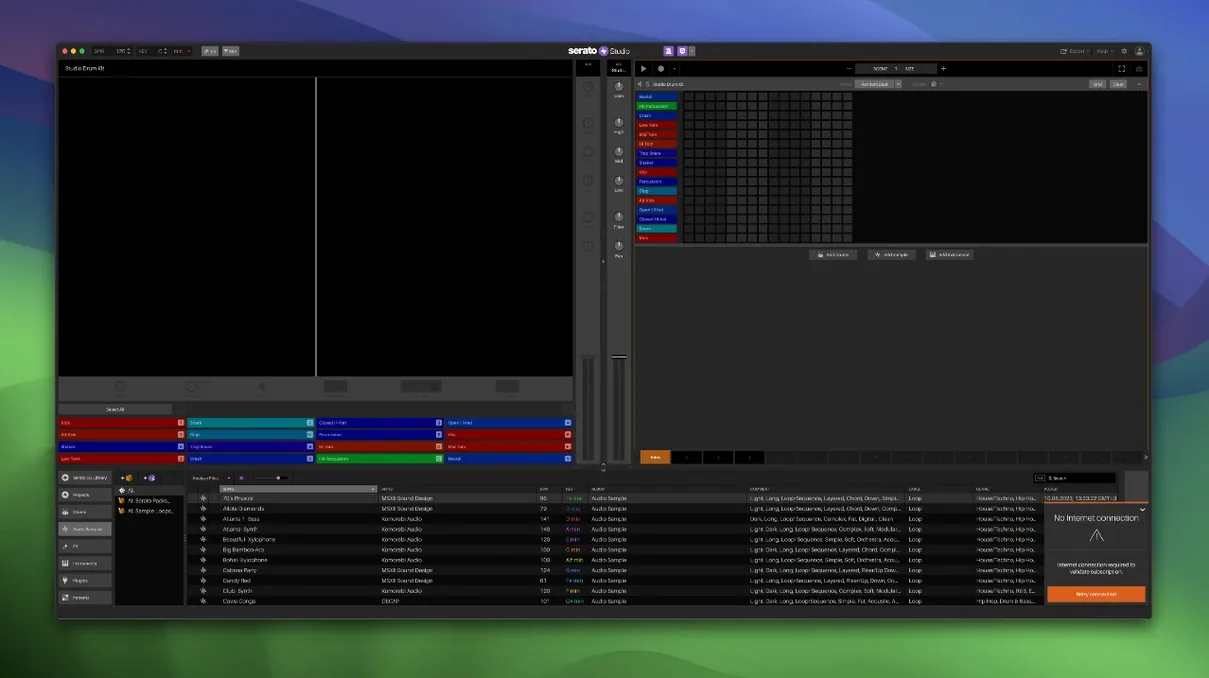
Version 2.5.0 of Serato Studio adds native control for the AlphaTheta SLAB and the ability to automate Stems On/Off and individual Stems Levels in Sample Decks. If you are new to the software, here are the first things to explore.
A single knob that introduces timing variations to mimic a live keyboard player. It makes programmed parts sound less robotic without needing to edit each note.
Export stems from any track, or adjust the level of acapella, melody, bassline and drum stems independently inside a Sample Deck. Useful when you want to rebalance a sample without leaving the project.
Serato Studio works with your existing Serato DJ library, so crates, ratings and favourites are shared. The library update in 2.5.0 also adds Track Rating, Favorite Crates and Crate Search.
Drum kits, instruments, loops and samples are included, along with ready-made drum patterns, BPM syncing and one-touch key switching. Enough to start a track without hunting for external samples.
The people who click fastest with this software are already working inside the Serato ecosystem. If you spin records with Serato DJ, the shared library means your crates, ratings and track history travel between the two apps without extra exporting. You can pull a loop you played out at a gig last night and build a studio arrangement around it the next morning.
Beat-makers who work sample-heavy will also find a natural home here. The Stems features let you isolate vocals or basslines from a track you have in your library, then adjust their levels before you even start sequencing. Producers who prefer a fast, sketch-like workflow rather than deep timeline editing tend to stay inside Studio for longer stretches.
DJs who do not consider themselves producers yet often find the entry point easier than a full DAW. The Auto Chord mode, the Feel control and the ready-made drum patterns remove a lot of the blank-page anxiety. If you already understand phrasing and key matching from DJing, you already understand half of what Studio asks of you.
Serato Studio works as a plugin host for both VST and AU instruments and effects, so any third-party synth or processor you already own can be loaded inside a project. The software also plays well with macOS system audio routing, which means you can route Studio's output into audio capture tools or streaming software if you want to record a live jam or broadcast a production session.
Because Studio shares the Serato library format, it integrates directly with Serato DJ Pro and Serato DJ Lite. Any crate you build in one app appears in the other, and track ratings sync both ways. This is useful if you prep your music library in Studio's browser but perform with Serato DJ.
On the file side, the app reads and writes standard audio formats, so moving stems or full mixes into Logic Pro, Ableton Live or any other DAW is straightforward. You can export individual stem tracks and then arrange them in a more traditional timeline if Studio's scene-based view ever feels limiting.
macOS features such as native window management and full-screen mode work as you would expect. The app also responds to standard macOS keyboard shortcuts for undo, save and copy, which keeps the muscle memory consistent if you switch between several creative applications in a session.
New users sometimes expect Studio to behave like a linear DAW and get confused by the scene-based arrangement. The trick is to think in sections — build a verse scene, a chorus scene, a breakdown scene — rather than one long timeline. Once that clicks, the workflow speeds up considerably.
Another frequent hiccup is plugin scanning. If a favourite VST or AU does not appear in the instrument or effects browser, check that it is installed in the standard macOS component or VST folders. Serato Studio does not scan custom plugin folders by default, so anything installed outside the usual paths will be invisible until you move or symlink it.
Some users report that Stems separation sounds different on the first load compared to later runs. This is usually because the initial separation happens in real time and the result is cached after the first pass. If you adjust the Stems levels and the mix does not change immediately, try triggering playback from the start of the scene again.
If the shared Serato library does not appear, make sure both Studio and Serato DJ are closed before you move or edit any crate files. Opening both apps at the same time while the library is being written can cause sync delays. A restart of both apps usually resolves it.
MIDI controller mapping is another area where people get stuck. Studio responds to standard MIDI learn, but some DJ controllers with proprietary HID protocols need a specific driver or a firmware update before the transport controls are recognised. Check the manufacturer's site if your hardware shows up in the system but does nothing inside Studio.
Before you start your first project, it is worth opening the setup screen and looking at the Reverse Pad Order option. By default, the pads are laid out left to right, bottom to top, which matches some hardware but not everyone's mental model. Flipping the order can make finger drumming or trigger-based arrangement feel more natural depending on your controller.
If you work with stems regularly, set the default Stems source folder in the library preferences. This saves you from navigating to your sample drive every time you open a new Sample Deck. The same preferences panel lets you choose whether new projects default to a specific BPM and key, which cuts down on repetitive setup.
The audio buffer size is worth adjusting early. A smaller buffer reduces latency during live recording or controller play but increases CPU load. A larger buffer is safer for dense projects with many plugin instances. Find the balance that lets you play without lag while keeping the project stable during playback.
Finally, if you use Studio alongside Serato DJ, set both apps to use the same audio output device in their respective preferences. This avoids the common issue where one app grabs the audio interface and the other falls silent until you restart the core audio service.
Yes. Serato Studio works with DJ hardware and integrates with the Serato DJ library, so your crates and ratings are available inside the software.
The Feel control adds subtle timing variations to your patterns, making them sound more like a live musician played them rather than a straight grid.
Yes. You can export stems from your project, and in version 2.5.0 you can also adjust individual levels for acapella, melody, bassline and drum stems in Sample Decks.
Serato Studio 2.5.0 Without Core Pack.pkg.Serato Studio 2.5.0 patch.Sign in or create your account to leave a comment.
No notes from photographers yet. If you have used this on a real folder, say which camera and which Mac.