Get it for my Mac (115 MB)
 DVDFab
12.0.8.2
DVDFab
12.0.8.2
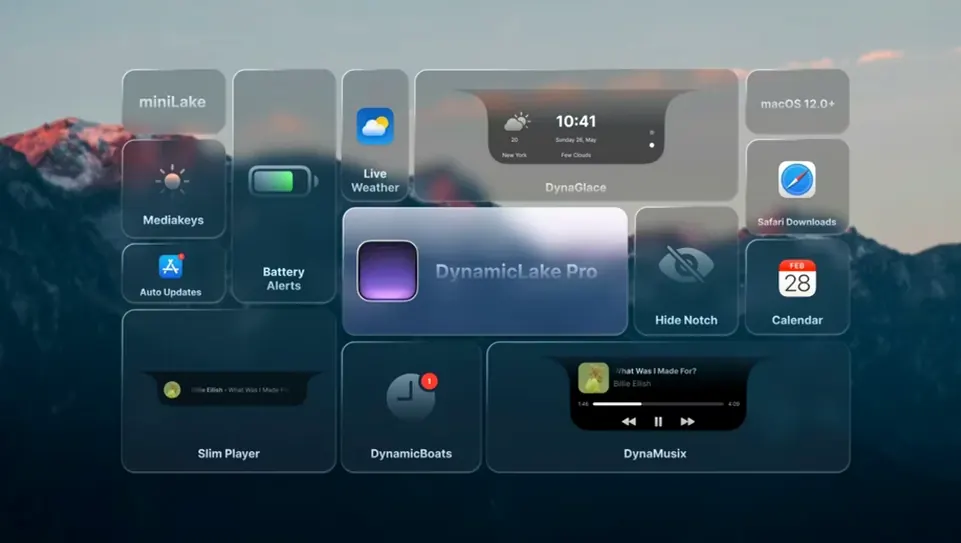
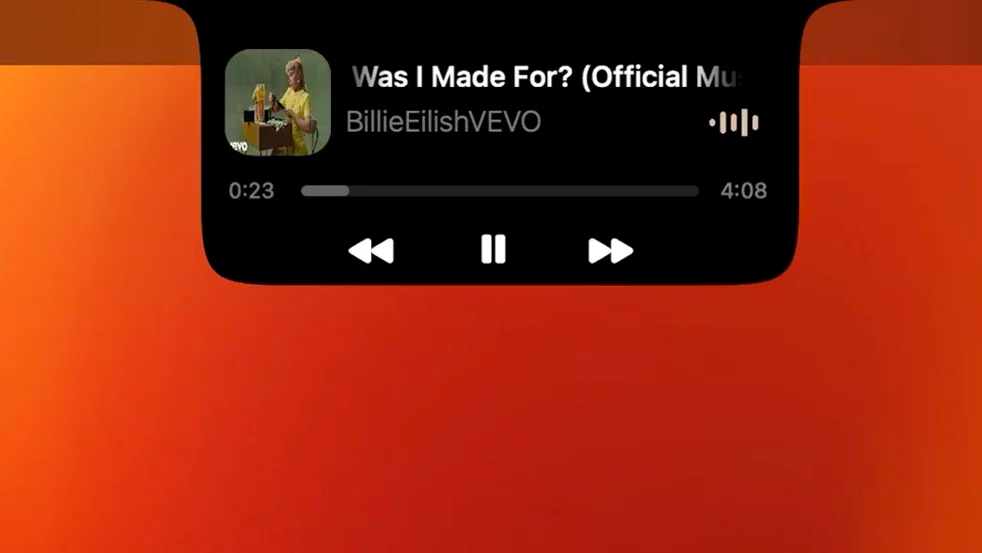
You already know the Mac’s menu bar — it’s where you glance for volume, Wi‑Fi, the time. DynamicLake Pro takes that same glance-and-go idea and gives it a bit more breathing room, adding a Dynamic Island-style strip that lives at the top of your screen. It’s not a gimmick; after a busy day of culling wedding photos, having volume and brightness controls pop up in a clean, animated panel (DynaKeys) saves me reaching for the Touch Bar or function keys. The Bluetooth connection alerts (DynaConnect) are handy when you’re swapping between AirPods and a studio monitor, and DynaMusic puts track info right there without switching apps. Push notifications with quick replies work for Messages, Mail, and a handful of others, so you can fire off a short answer without leaving Lightroom. The whole thing runs on both Intel and Apple Silicon Macs, and the interface language list covers most of the team.
Let’s say you’re editing a batch of portraits in Capture One. You want to skip a track, check if you have a meeting soon, and adjust the brightness without leaving the app. Here’s how that goes with DynamicLake Pro.
You press the keys for DynaMusic — the music widget shows the current track and a small animated waveform. From there you can skip or pause without switching windows. Next, you glance at DynaGlance, which sits in the Dynamic Island-style strip. It shows the next calendar event and the current weather, updated in real time. No need to open Calendar or Weather. Finally, you use DynaKeys to slide the brightness down a notch because the afternoon sun has shifted. The whole sequence takes a few seconds and you never leave your photo editor.
For a notification-heavy workflow, the push notification system works with quick replies for Messages, Mail, and a few other apps. A short reply to a client about a delivery date happens in the notification itself. The app switcher, DynaSwitcher, uses Option+Tab to move between open applications, which is faster than Exposé when you have a dozen apps running.
If you prefer a smaller visual footprint, miniLake strips the interface down to the core functions. It shows the same notifications and controls but takes up less space at the top of the screen.
Version 1.8 is the current release, and a few everyday things work differently now. Timers you create in the macOS Clock app appear automatically in DynamicLake Pro — you see the countdown in the strip without opening Clock. That’s useful when you’re timing a developing bath in a darkroom or a roast in the kitchen.
The changelog also mentions support for macOS 27 in a later release, so the app is being kept up to date with newer system versions. For now, 1.8 runs on macOS 11 and later on both Intel and Apple Silicon Macs.
DynamicLake Pro works alongside the usual macOS tools rather than replacing them. The DynaKeys controls for volume, brightness, and keyboard backlight mirror the function keys, so you can use either method. The Bluetooth alerts in DynaConnect show when a device connects or disconnects — helpful if you share a studio Mac that swaps between multiple headsets.
The calendar and weather data in DynaGlance comes from the same sources macOS uses, so the information is consistent with what you see in Calendar and Weather. The app switcher behaves like the standard Command+Tab but uses Option+Tab, which is configurable in the settings.
For photographers, the quick reply notifications work with Messages and Mail, which is where most client communication happens.
The audio and video conversion features mentioned on the site are not a full media editor, but they handle basic format changes without opening a separate app.
DynamicLake Pro requires macOS 11 or later. It runs on both ARM (Apple Silicon) and 64-bit Intel Macs, so any Mac from the last several years should work. The app is lightweight — it adds a visual strip at the top of the screen and a few background processes for notifications and Bluetooth monitoring. You don’t need to disable System Integrity Protection or install kernel extensions. Installation is a simple drag-and-drop from the disk image into the Applications folder, then launch from Launchpad.
The interface supports thirteen languages, including English, Russian, German, Hebrew, Spanish, Italian, Simplified Chinese, Korean, Portuguese, Slovak, Turkish, French, and Japanese. That covers most international teams and personal preferences.
One common mistake is trying to configure every feature at once. The app has several modules — DynaMusic, DynaKeys, DynaGlance, DynaSwitcher, DynaConnect, miniLake — and turning them all on before you know what each one does can feel overwhelming. Start with the two or three you use most. For photographers, that’s often DynaKeys for brightness and volume, and DynaMusic for track control during editing sessions.
Another mistake is ignoring the notification permissions. The app needs access to show push notifications and quick replies. If you skip the permission prompt, notifications won’t appear in the Dynamic Island strip and you’ll wonder why. Check System Settings > Notifications if things aren’t showing up.
Some users expect the Dynamic Island to behave exactly like the iPhone version. It doesn’t — it’s a macOS adaptation that lives at the top of the screen rather than inside a notch. The animations and interactions are similar, but the placement and behaviour are tailored for a desktop workflow.
A minor but common oversight: not customising the weather location in DynaGlance. The default location may be off, especially if you travel between studios or edit on location. Set it once and it stays.
Finally, people sometimes forget about miniLake. If the full strip feels too wide or distracting, miniLake keeps the same functionality in a smaller format. It’s worth trying before you decide to disable the app entirely.
Yes, the app supports both ARM (Apple Silicon) and 64-bit Intel Macs running macOS 11 or later.
It displays push notifications with quick reply support for several apps, including Messages and Mail.
Yes, DynaMusic provides music control with animation, letting you see and change tracks without opening the music app.
Tip: If macOS blocks the app on first launch, right-click it in the Applications folder and select Open.
Sign in or create your account to leave a comment.
No notes from photographers yet. If you have used this on a real folder, say which camera and which Mac.